In Microsoft Excel users store their important information and other crucial data. In order to protect their crucial data users give a password to protect their Excel file. But with time its human nature to forget their password. But don’t need to worry. In this blog, we have written an automated method on how to recover lost Excel workbook password.
Overview
Microsoft Excel is a spreadsheet program where one can store data in the form of table. It is easy to analyse data is excel spreadsheet. User can store their important information in the form of table in Excel.
To protect their crucial data, users give a password to protect it from unauthorised access, or users wish only the intended users can open the Excel sheet, who have the password. But you need not worry about solving your problem, we have mentioned the automated method in this article that will help you to recover your lost/forgotten Excel workbook password.
Best Software to recover lost Excel workbook Password
The best software to recover lost Excel workbook passwords is eSoftTools Excel Password Recovery Software. This is the most advanced and reliable software that can recover an Excel password with a few clicks. With an advanced method, it can recover lost/forgotten passwords in a few minutes.
Also Read:- How to open locked Excel workbook without password?
Key features
- Recover lost Excel workbook password with a few simple steps in the software.
- You can recover the password and unlock the Excel file with advanced recovery methods
- Brute force Attack: In this method, no character of the password is known, and the password is recovered by applying different combinations.
- Mask Attack: In this method, some part of the password is known, and the rest is recovered.
- Dictionary Attack: In this method, a password is recovered from the dictionary file that stores multiple words.
- Recover password of MS Access and Word: You can recover password of MS Access and MS Word by purchasing the paid version of the software.
- Software unlocks the password of both the Excel worksheet and the Excel workbook.
- This software can open Excel file passwords of any version, including Office 2021.
- Has the best and fastest algorithm to find the forgotten password in a few minutes.
- The free demo version is available to try the software before purchasing.
Steps to recover Excel Password
- Download and install eSoftTools Excel Password Recovery software on your system.
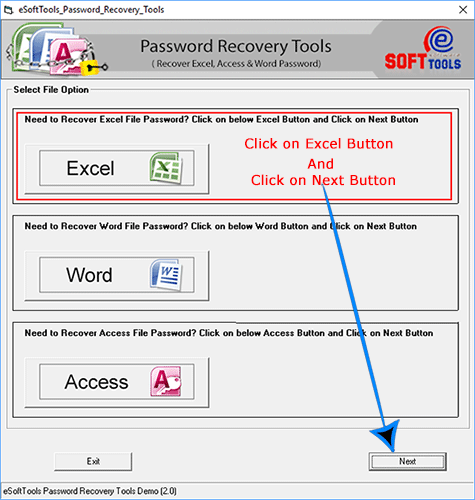
- Click on the browse button and load the encrypted Excel file.

- Select the recovery method from the available three methods (Brute Force attack, Mask Attack, and Dictionary Attack).
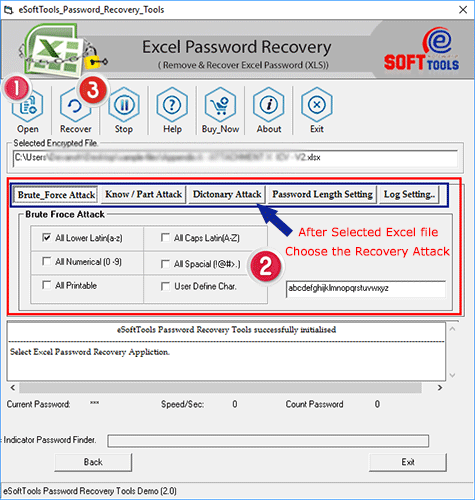
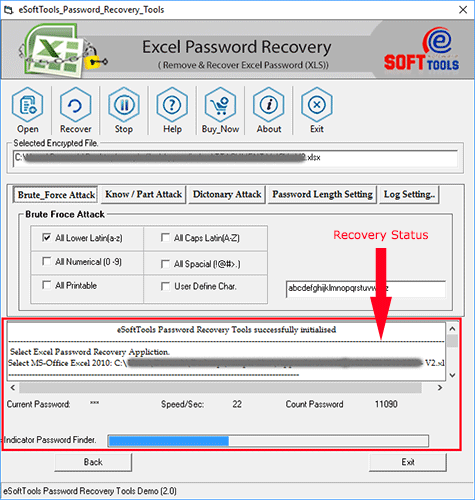
- Press the Recover button and start recovering the forgotten password.
Conclusion
In this blog we have explained the automated method to recover forgotten Excel file Password. The automated method is simple and easy, with few steps you can recover your forgotten Excel file password. You can try the demo version at free of cost.


No Comments yet!