Are you looking to open NSF files without Lotus Notes? If yes, then you need not to worry. In this blog, we have explained the automated method to open NSF files without Lotus Notes.
Overview
Lotus Notes and Outlook are two of the most major email clients. These email client applications are used in both large-scale and small-scale organisations. Every organisation uses an email client according to its needs. However, the two email clients differ in various aspects. Lotus Notes, now known as HCL Notes, uses NSF (Notes Storage Facility) files, and Outlook uses PST (Personal Storage Table) files to store data items such as emails, contacts, calendars, tasks, etc. If you want to switch from Lotus Notes to the Outlook email client, you need to convert NSF files to PST files. To convert NSF to PST files is a tedious task, but with the right method and right application, this task is easy.
Why Access/Open an NSF file without Lotus Notes?
There are various reasons to access/open an NSF file without Lotus Notes when a user wants to access and open NSF files in Outlook.
- Outlook has an easy graphical interface, which is why users want to shift from Lotus Notes to Microsoft Outlook.
- Changes in business needs and market trends make users switch from Lotus Notes to Outlook.
- Job switch is another reason why users migrate from Lotus Notes to Outlook, because in the new organisation, if Outlook is used, then users need to transfer data from Lotus Notes.
- Maintenance of Lotus Notes is costly than Outlook.
Best software to open an NSF file without Lotus Notes
The best software to open NSF files without Lotus Notes is eSoftTools NSF to PST converter software. This is the advanced and most efficient software to convert NSF to PST files.
Key features
- You can convert a single NSF mailbox and multiple mailboxes into a PST at a time.
- You can convert NSF files to other file formats also such as EML, EMLX, MBOX, HTML, ICS and vCard etc.
- In the preview panel, you can see the inner content of the NSF files and folders.
- You can export NSF file contacts to vCard and calendars to ICS format.
- It can work with NSF files of all editions of IBM Lotus, such as 10.0.1, 9.0.1, 9.0, 8.5, 8.0.2, 7.0, 6.5, 6.0.
- In the demo version, you can convert 25 files from each folder of the NSF file to PST.
Also Read: How to Merge NSF Files into a Single File in a Safe Manner?
Steps to convert NSF files to PST files.
- Download, install and launch eSoftTools NSF to PST converter software in your system.
- Click the Select NSF button to select the NSF files in the software.

- Preview the NSF file contents, such as email, contacts, calendars, Notes, tasks, etc., in the preview panel and select.

- Click the convert button and jump to the conversion wizard.
- Select the PST button from the conversion format and browse the saving location for the converted file on your system.
- Apply email filtering and naming convention features if you want.
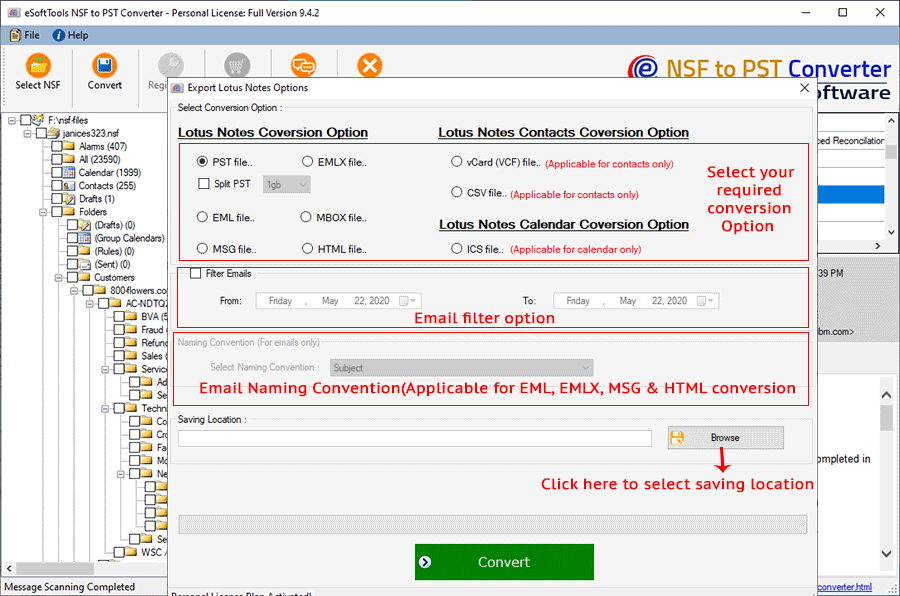
- Click the Convert button and start the conversion from NSF to PST.

- Once the conversion process is complete, you can import the PST file in MS Outlook.
Note: This software can convert Lotus Notes NSF files to Outlook PST files, but the Lotus Notes application needs to be installed on your system.
Conclusion
In this blog, we have explained the automated method to open NSF files without Lotus Notes by converting NSF files to PST files. You can also use the manual solution also but they are time-consuming, not suitable for bulk conversion and has a high risk of data loss. The automated method is quick, reliable and suitable for bulk conversion.


No Comments yet!