Are you looking to convert OST to EML Files format? If yes, then your search ends here. In this blog, we have outlined an automated method for converting OST files to EML files.
Overview
Microsoft Outlook stores data in OST files offline and allows users to access emails, contacts, calendars, tasks, and notes when not connected to the internet. When the internet connection is restored, OST files synchronise with the Exchange Server and get updated. A problem arises when OST files get corrupted or become orphans, because then they become difficult to open and even migrate to other email clients.
EML files store individual emails with attachments, and they are supported by email clients like Windows Live Mail, Outlook Express, Thunderbird, Apple Mail and more.
By Convert OST files to EML files, users don’t depend solely on Microsoft Outlook and can open them in other email clients supporting EML files and can easily share EML files with friends and colleagues.
Read also-
Reasons to convert OST to EML files
- EML files are widely compatible with email clients like Windows Live Mail, Outlook Express, Thunderbird, Apple Mail, eM client and more.
- EML files store individual emails, which makes them better for organising, storing and backup purposes.
- OST files are connected to Exchange Server, and once disconnected, they become inaccessible. By converting OST files to EML files, you don’t have to depend only on Microsoft Outlook.
- EML files are easily shared and occupy less storage space than OST files.
- EML files are compatible with different operating systems, like the Windows operating system and the MAC operating system, and can be opened without Outlook.
Automated method to convert OST to EML files
With eSoftTools OST to EML Converter software, you can easily convert OST files to EML files. With this tool, you can convert OST files to EML and other file formats like PST, MSG, MBOX, HTML, vCard, ICS, and other formats. Moreover, you can export OST files to cloud applications like Gmail, Yahoo Mail, Office 365, and IMAP accounts.
Key features
- Provides preview of all Outlook items from the OST file in the preview panel of the software without the need for MS Outlook.
- Enables users to select the contents of the OST file that users want to transfer to EML files.
- Filter Emails by Date and Export OST emails to EML files based on date.
- Its graphical interface is easy to use, and non-technical people can use it easily.
- Supports all types of OST files corrupted/encrypted/damaged/orphaned.
- Saves EML files with different names based on subject, date and from.
- Compatible with OST files of any Outlook editions – 2021, 2019, 2016, 2013, 2010 & below versions.
Steps to convert in eSoftTools OST to EML converter software
Download and install the eSoftTools OST to EML Converter Software.
Click the Select OST button to open the OST file. Adding Windows: –
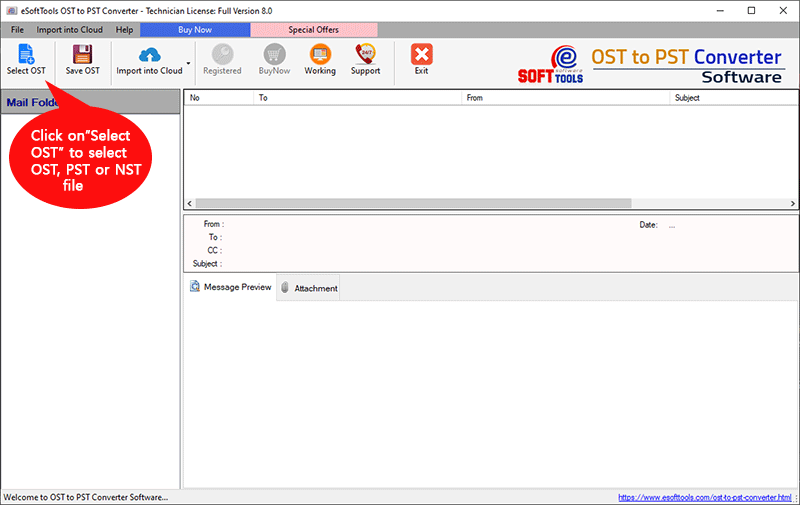
- Choose a conversion mode from the available options: –
- Single OST file conversion: Select one OST file from the system for conversion.
- Bulk OST file conversion: To select multiple OST files from the system for conversion.

Add OST files, with your chosen option, and click on the Start Scanning button.
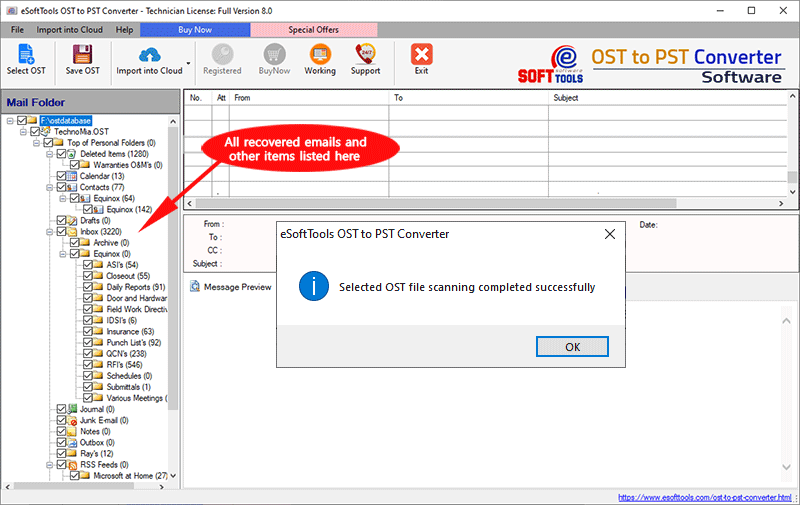
Scan OST files and Preview OST files’ inner contents, such as emails, contacts, calendars, tasks, notes, etc.
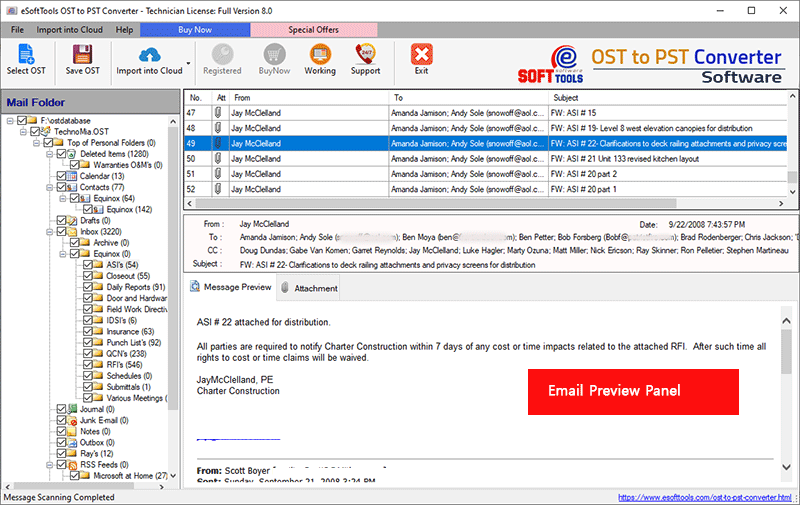
Choose the needed mail folder for exporting from OST file.

Click the Convert button and start the OST to EML file conversion process.
Conclusion
In the above blog, we have mentioned an automated method to convert OST files to EML files. We have provided a free trial version of the software for customer satisfaction. Use the trial version to convert OST files to EML files and check how the software works. In trial version, we have allowed 25 items from OST files to be converted to other file formats, and if you get the desired result, you can purchase the license for full usage.


No Comments yet!