Do you want to convert Google Takeout MBOX file to EML format? If so, you have found the appropriate page. In this blog we have explained an automated method to convert Google Takeout to EML file format.
Overview
Google Takeout also known as Download your Data, is a service launched by Google Data Libration Front that allows users of Google Services like Google Drive, photos, Gmail to export their data to downloadable archive file.
EML is a file format that is used to store individual emails with attachments and is supported by email clients like Outlook Express, Windows Live Mail, Apple Mail and others.
Also read-
Reasons to convert Google Takeout to EML file format
- After converting Google Takeout MBOX file to EML file format users can easily use them in email clients like Outlook Express, Windows Live Mail, Apple Mail, etc.
- EML files are easily shareable files and can be shared with friends and colleagues.
- By converting Google Takeout MBOX file to EML file user can easily find their duplicate emails. Many users for removing duplicate emails from Gmail inbox converts Google Takeout MBOX file to EML file.
- EML file is supported by many applications and used for legal research purposes so conversion can be helpful for many users.
Automated method to convert Google Takeout to EML file format
With eSoftTools Google Takeout converter software, you can easily convert Google Takeout MBOX files to EML file format. With a few clicks, you can convert Google Takeout MBOX files to 10+ different file formats, like PST, EML, EMLX, MSG, HTML, MHTML, Thunderbird, and Zimbra. Additionally, it can migrate Gmail MBOX files to cloud-based applications like Gmail, Yahoo Mail, Office 365, Outlook.com, and IMAP servers.
Key features
- Import and Load Gmail/Google Takeout MBOX files with three different options- Add file, Add folder, and Auto-load Thunderbird profile.
- Maintain the data structure and email meta properties(To, cc, bcc, subject, Date, message body, etc) while conversion.
- Save converted files of Google Takeout MBOX files to your desired location on your system.
- With mail filtering, you can filter Google Takeout emails by the Date Range( From and To).
- Consistent with all editions of the Windows operating system like Windows 11, 10, 8.1, 8, 7 & below.
- Before conversion, you can view Google Takeout MBOX files and folders in the preview panel inside the software.
- Have the naming convention feature by which you can name emails based on Subject, Date, and From fields.
Steps to convert Google Takeout to EML file format
Download and launch the eSoftTools Google Takeout converter software on your computer.
Press the Add File/Folder button on the top menu.

Next, select any one option to Select MBOX file from the options- Select MBOX file, Select MBOX folder, and auto-load Thunderbird profile.
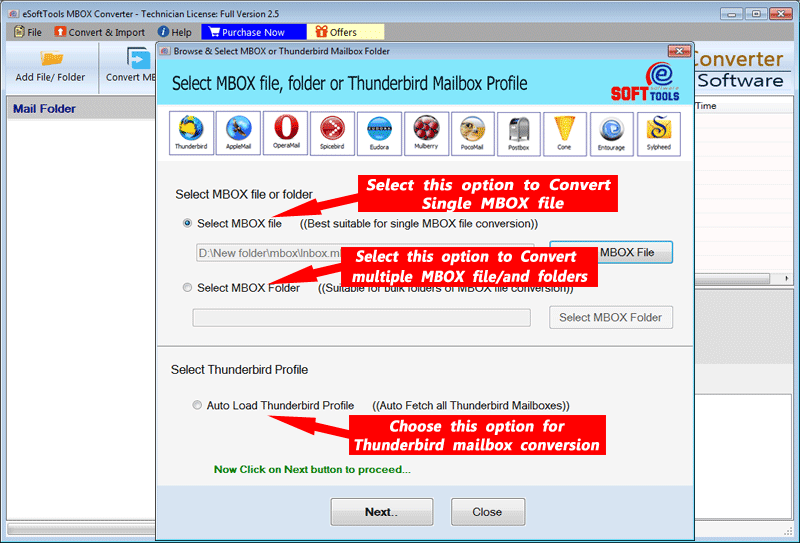
Software will load the MBOX file and preview all the inner items of the MBOX files and folders in the software.

Make a selection of the necessary MBOX files and folders and click the Convert MBOX button on the above menu bar.
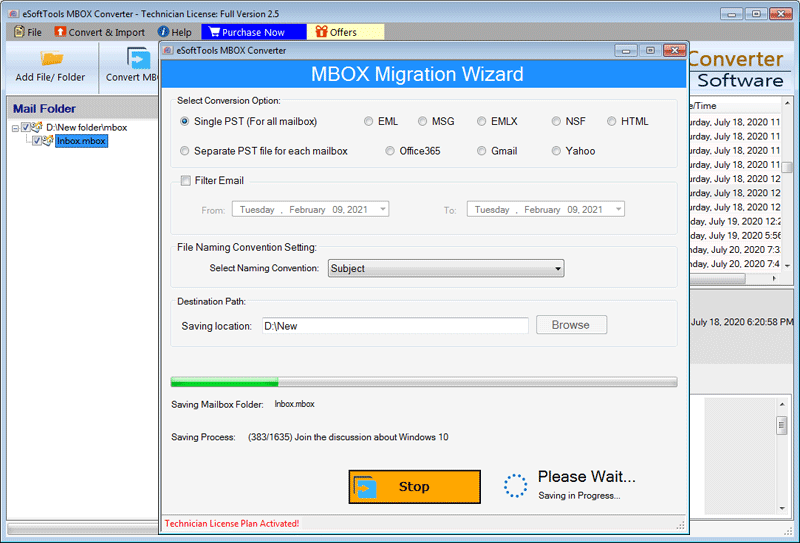
Select the EML option from the list of available conversion options.
Conclusion
In this article, we have described an automated method required for converting Google Takeout to EML formats. We have explained an automated method step by step that will help in conversion. If you have any problem or doubt in your mind, you can contact our Support Team.


No Comments yet!