This blog will be useful in providing a solution for converting an EML file to HTML format. Here, we will describe a software that will help you in resolving your query on how to convert EML files to HTML. The software will convert batch EML files to HTML format without any error and in a few seconds.
Overview
EML is a file that contains a single email message with attachments. It contains email elements like To, cc, bcc, subject, From, Body, Date, etc. Many email clients support EML files, like eM client, Outlook Express, Windows Live Mail, Mozilla Thunderbird, Apple Mail, etc.
HTML files are text-based documents that contain codes that run in a web browser like Google Chrome, Mozilla Firefox, Internet Explorer, etc. These files are used to create a web page containing text, images.
Read also-
How to Convert EML to MSG File Format?
Reasons to convert EML file to HTML
Supported by Multiple Browsers: EML files can be opened on email clients that support them, but to open HTML files, you don’t need an email client and can open them on browsers like Google Chrome, Mozilla Firefox, Internet Explorer, etc.
Better presentation and readability: HTML file formats allow users to have better presentation of their email content with rich text, images and hyperlinks and have a better overall experience.
Cross-platform compatibility: HTML files can be opened on a wide range of devices, like desktop computers, laptops, tablets and smartphones.
Automated method to convert EML files to HTML
eSoftTools EML Converter suite is the powerful and smart tool that can convert EML files of email client like eM client, Windows Live Mail, Outlook Express, Thunderbird to HTML and other file formats like MSG, MBOX, NSF, EMLX, PST, etc. Moreover, it exports EML files to cloud applications like Gmail and Office 365.
Key features
- Convert EML and EMLX files with attachments.
- Allows adding multiple EML folders in the software.
- Convert EML files into another file format like MSG, MBOX, NSF, HTML, MHTML, etc.
- Preview of EML files/folders before conversion in the preview panel.
- Enables loading of EML files from different locations of the user system and conversion in bulk.
- Maintains the folder hierarchy and data formatting while converting.
- Software preserves email formatting and maintains email meta properties (To, cc, bcc, subject, Date & Time) during conversion.
- Can migrate EML files to cloud-based applications like Office 365, Gmail, Yahoo Mail, Outlook.com and IMAP.
- Consistent with all editions of the Windows Operating System such as Windows 11, 10, 8.1, 8, 7 & below versions.
Steps to convert EML files to HTML
Download and install the eSoftTools EML Converter Suite software on your system.
Click on Select EML folder (To choose multiple EML folders) or EML files (To choose EML files) and click the Next button to add files and folders in the software and start scanning.

In the preview panel, you can view EML folders and select the EML files to be converted into HTML files.

On the EML converter wizard, choose Export in HTML file format from the options in the conversion wizard.
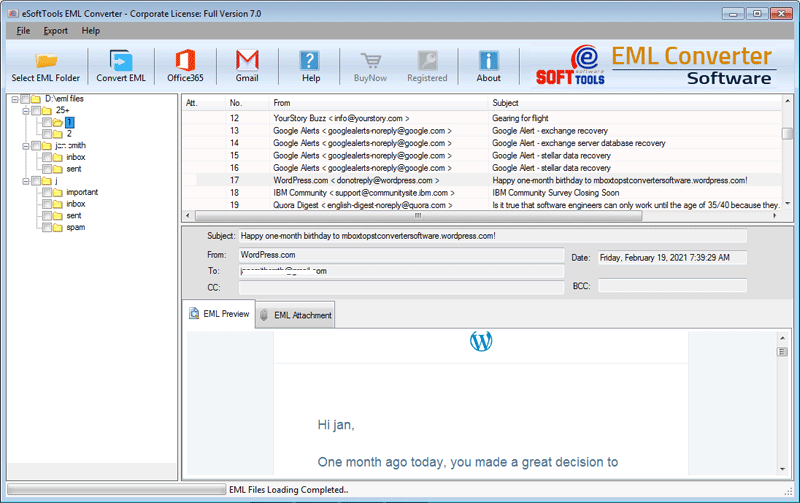
Browse the location where you want to save the HTML file in your system.
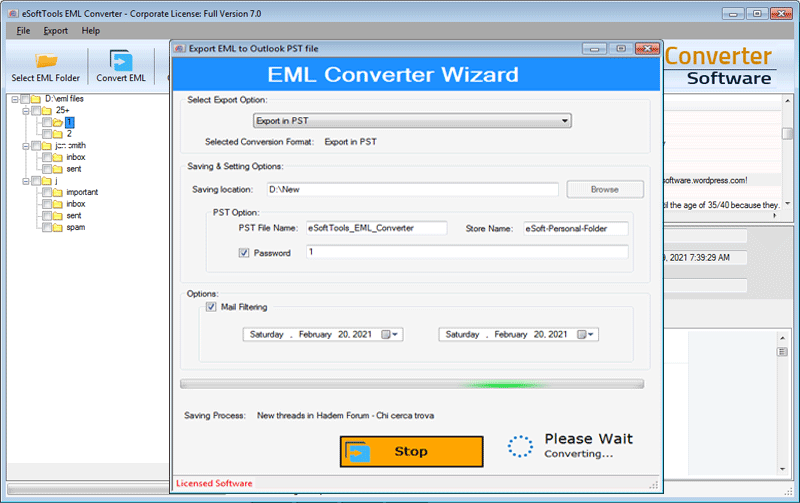
Apply the mail filtering if you want to filter emails according to the Date Range (From and To).

Click the convert button and start the conversion process from EML to HTML.
Conclusion
Above, we have explained an automated method to convert EML file to HTML format. There are manual methods also available, but they are time-consuming and require technical expertise. With the eSoftTools EML converter suite, you can convert batch EML files to HTML format.


No Comments yet!