Are you considering making the switch from Yahoo Mail to Gmail? A common worry is that you might lose your old emails, but don’t fret – transferring emails is a breeze and won’t destroy any of your data. In this guide, we’ll show you every step for transfer emails from Yahoo Mail to Gmail account. So let’s dive in.
Overview
Yahoo Mail is among the oldest and most well-known email services. It provides generous storage, an easy-to-use interface, and strong security features. Notable features of Yahoo Mail include intelligent spam protection, personalized themes, and mobile access via the Yahoo Mail app.
Even though Yahoo Mail is good, some people feel it has flaws. Because of this, users switch to better programs like Gmail to fix those issues.
Also Read:- How to Migrate Yahoo Emails to Zoho Mail?
Why Transfer Emails from Yahoo Mail to Gmail Account?
- By transferring your Yahoo email to Gmail, you’ll get an additional backup of your important messages, ensuring your data remains safe.
- Many users appreciate Gmail’s advanced features, better integration with Google services, and user-friendly interface. This is why they are moving their email from Yahoo Mail to Gmail.
- You might want to move specific emails from Yahoo Mail to a colleague or family member’s Gmail account so that sharing or collaborating on them becomes easier.
Solution to Transfer Emails from Yahoo Mail to Gmail Account
For a smoother migration, using an IMAP migration tool is highly recommended. Tools like the eSoftTools IMAP to Gmail Migration tool will allow you to efficiently migrate all your email folders. Migrate all email folders, including inboxes, sent emails, drafts, and custom folders, while preserving attachments and email metadata. It offers options to filter emails by date or folder, allowing you to choose the ones you need. This tool is faster and more reliable, especially for large email boxes, reducing the risk of interruptions or errors.
How to Transfer Emails from Yahoo Mail to Gmail Account?
- Install and download the eSoftTools IMAP Mail Migration Tool on your computer.

- Launch the tool and choose Yahoo Mail as your email provider.
- Enter your Yahoo email address and Yahoo app password. Check the following IMAP details:
- IMAP Host: imap.mail.yahoo.com
- Port: 993

- Click Login to connect to your Yahoo account and load all your mail folders.
- Select the email folders you want to transfer to Gmail (Inbox, Sent Emails, Drafts, etc.).

- Click Import to Cloud, select Import to Gmail, then click Next.

- Enter your Gmail email address and app password, then click ‘Authenticate Login’ to connect the tool to your Gmail account.
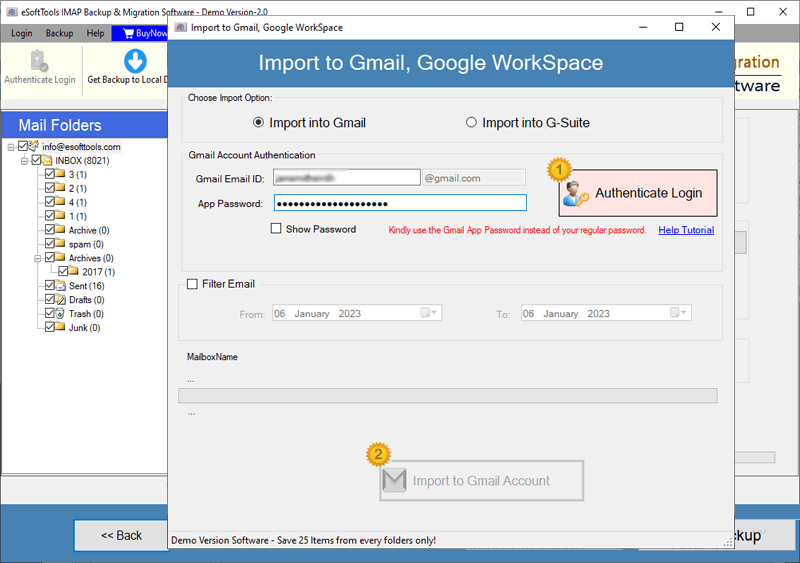
- (Optional) Apply a date range filter to transfer only emails from specific periods.
- Click on ‘Import to Gmail’ to start the email migration process.

Conclusion
It’s easy to transfer emails from Yahoo Mail to Gmail Account. You can use Gmail’s built-in import feature or the Advanced IMAP Migration Tool. The manual way is free but has limits, especially for big inboxes or complicated folder setups. The IMAP Migration Tool is a lot better and ensures all your emails, folders, and attachments transfer without errors.
FAQ
Can this tool export the entire data of an IMAP email account to Gmail in a single process?
Yes, users can export entire mailboxes/mail folders from their IMAP account to Gmail at one time.
During the IMAP mail folder export process, does this software help maintain the mail folder hierarchy?
Yes, this software exports mail folders from an IMAP account and saves them in a Gmail account while preserving the folder hierarchy.
Can I migrate mail folders from Zoho Mail to a Gmail account using this IMAP to Gmail Migrator?
Yes, with the help of this software, users can migrate emails from ZOHO Mail, Office365, Outlook.com, Yandex Mail, and all other IMAP-based mail apps.
Can a non-technical person operate the software to complete the migration process from IMAP to Gmail?
Yes, whether it is a technical expert or a non-technical user, both can easily operate this software without any prior knowledge.


No Comments yet!