In this blog, we are going to discuss how to extract email addresses from OST files quickly and securely in bulk. Whether you have a damaged or inaccessible OST file we will discuss the method to extract email addresses from OST files. In this blog, we will discuss an automated method for extracting email addresses from OST files.
Overview
Nowadays many users use MS Outlook for managing their email accounts. They use MS Outlook to share their emails. Easily users can configure their email accounts with MS Outlook and start managing and organising their email accounts with MS Outlook.
MS Outlook stores data in two file formats OST and PST. These files store and manage users’ emails, contacts, calendars, tasks, notes, etc.
Each Outlook item that stores OST files, such as emails, has properties like To, cc, bcc, from, subject, body message, attachment, etc. Sometimes, there are scenarios when users need to extract email addresses from OST files in bulk.
Reasons for extracting email addresses from OST files
Creating a contact list: The user can create their contact list by extracting email addresses from OST files. Users can extract contacts and email addresses and create their own lists.
Shifting selective data: Users need to extract email addresses from OST files because by extracting email addresses users can filter their emails from the large database and extract emails and messages that they require.
Also Read: How to Extract Email Addresses from Gmail Account?
Best way to extract email addresses from OST files
Manually you can extract email addresses from OST files but they are time-consuming and take a lot of time. You can extract email addresses from OST files using eSoftTools Outlook email address extractor software.
This is automated software that extracts email addresses from Outlook OST/PST files. It can extract email addresses from all Outlook items, such as contacts, calendars, notes, tasks, and other mailbox items, without misplacing or losing information.
How to extract email addresses using Outlook email address extractor software
- Download and install eSoftTools Outlook email address extractor software on your system.
- Press the Select PST button and choose from the file add options
- Single OST/PST conversion: Add a single OST/PST file in the software.
- Bulk OST/PST conversion: Add multiple OST/PST files in the software for extraction of email addresses.

- Add OST/PST files and start the scanning of OST files/folders.
- Preview all the files/folders in the preview panel and select the files/folders from which you need to extract email addresses.

- Select and apply these settings for Outlook email address extraction
- Saving format: Choose a file type from options- CSV, TXT and HTML to save extracted email addresses.
- Email filter criteria: Select the email address field from the options- To, cc, bcc, from and all.
- Mail filter: Filter emails according to Date by giving a Date Range( From and To).
- Saving location: Manually specify the location where you want to save the resultant file with email addresses.
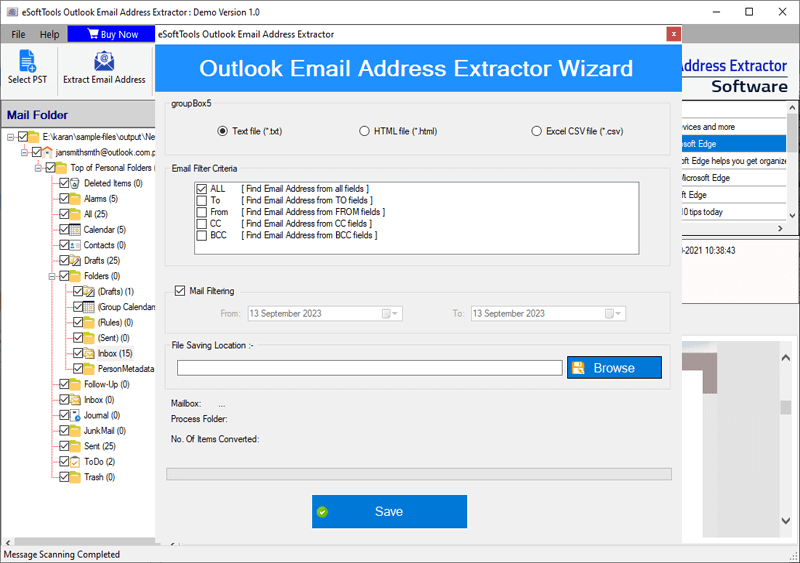
- After applying the required settings, press the save button
- Create a single file: Save all extracted emails in a single file.
- Create a separate file according to the mail folder name: Create a separate file to save the email addresses of each folder separately.
- At last, click the continue button and save the extraction of email addresses.
Conclusion
In this blog, we have discussed the reasons and the automated method of extracting email addresses using the Outlook email address extractor software. You can extract email addresses using the automated method without any data loss and with 100 % accuracy.


No Comments yet!