vCard(VCF) files store contact information that email clients, devices, and platforms can access. Some vCard(VCF) files contain multiple contacts and need to be split. If you have a vCard file that contains multiple contacts and want to be split, you are in the right place. This blog explains an automated method for splitting one vCard file into multiple vCard files.
Splitting the vCard contact file into multiple contacts makes it easier to manage and organise. In this blog, we have explained a professional tool that makes the splitting of vCard files into multiple files.
Read also
Why split one vCard file into multiple vCard files?
There are various reasons why one wants to split a vCard file into multiple vCard files
- File size management: If the file size of one vCard file is large, then splitting large vCard files into multiple vCard files makes them easy to manage.
- Organisation: If one vCard file contains contacts from different groups like work, office, and family then splitting them according to group helps in better organisation.
- Backup & Restoration: When you want to back up vCard files, backing up data using small vCard files is easier because if something goes wrong with a smaller vCard file, you won’t lose all the data.
- Selective Sharing: It is easier to share a small vCard file containing limited contact information than a large vCard file and you can share a selective vCard file according to need.
Smart Solution to split vCard(VCF) files to multiple Contacts
The smart solution to Split vCard (VCF) Files to Multiple Contacts is eSoftTools vCard splitter software. This is the most advanced software that uses the finest algorithm to split one large vCard file into multiple vCard files. With a few clicks, you can easily split a large vCard file into multiple vCard files.
Key features
- Split vCard/VCF files containing multiple contacts into multiple vCard/VCF files having single contacts.
- Merge vCard files and combine multiple vCard files into a single vCard file.
- Convert vCard files with contacts to Outlook PST, MSG and CSV format.
- Keep the data formatting in the same structure while splitting the vCard file.
- Can split the vCard/VCF file of any size and with unlimited contacts.
- Supports vCard/VCF file of versions- 1.0, 2.1, 3.0, and 4.0.
- Easy graphical interface that non-technical people use it without technical expertise.
- Works with all editions of the Windows Operating System from the latest to older versions.
Step-by-step approach to split vCard files
Download and launch the eSoftTools vCard splitter software in your system.
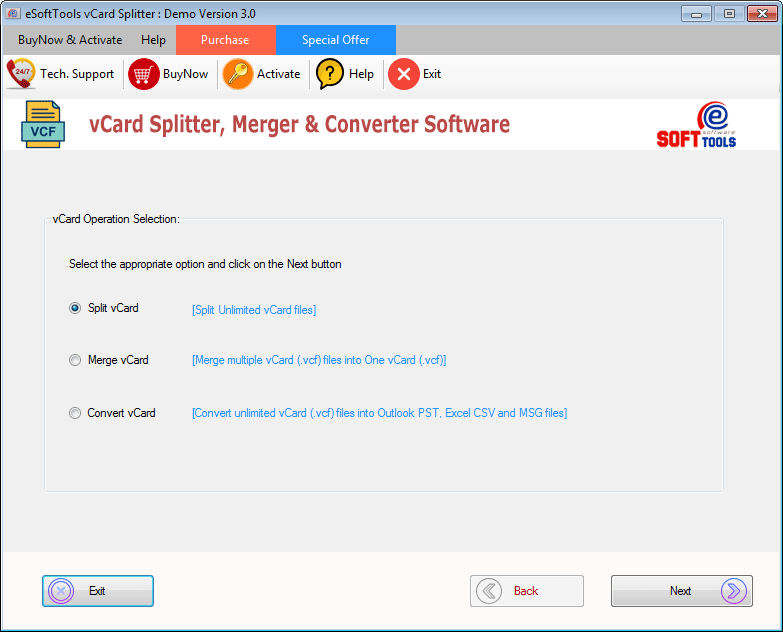
Select the Split vCard option on the screen and click the next button.

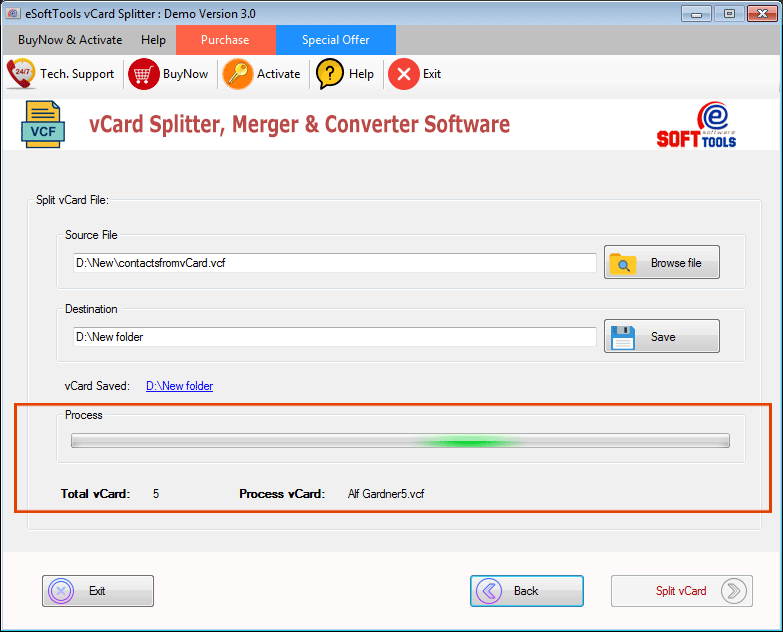
Click the Browse File button to add a vCard file for splitting from your system.

Click the Save button and choose the location to save the multiple split vCard files in your system.

At last, click the split button to start splitting the vCard file.
Conclusion
There are manual methods are also available to split vCard/VCF files but if you want to split vCard/VCF files in bulk use the professional software explained above. For trial purposes, you can use the demo version which can split the vCard file into 5 contacts and if you want to further use it, you can purchase the software.


No Comments yet!