Are you looking to convert OST files to Zimbra mail client? If yes, then you don’t need to worry. In this blog, we will discuss an automated method to convert OST files to Zimbra, which you can do in a few clicks.
Overview
OST are Offline Outlook files used to store Outlook data such as calendars, contacts, tasks, and notes. When an internet connection is established, the Outlook OST synchronizes with the Exchange server. However, it becomes an orphan when it is not connected to the Exchange server on the internet.
Zimbra is a free, open-source email client that allows you to manage multiple email accounts with a single interface. It can also manage emails, contacts, calendars, tasks, notes, and more.
Reasons to Convert OST Files to Zimbra Mail Client
- Synchronisation issues: Outlook OST files are offline files that it is used when the user is not connected to the internet, so changes made in the OST file are not synchronised with the server. However, there is no synchronisation issue with the zimbra; changes made are reflected with the server.
- OST file corruption: OST files are more prone to corruption, virus attacks, and any malicious activity that makes OST files corrupt. So it is better to convert the OST file to Zimbra.
Also Read: How to Import PST to Zimbra Mail?
Smart solution to convert OST to Zimbra
The smart and efficient solution to Convert OST Files to Zimbra Mail Client is to use eSoftTools OST to Zimbra converter software. With a few clicks, you can easily convert OST to Zimbra without any data loss and with 100% accuracy. Its interface is so user-friendly that you can navigate the whole process easily and without any technical expertise.
Key features
- Can convert bulk OST, PST and NST files to other multiple file formats.
- Easily recover & convert OST files obtained from applications like Office 365, Outlook.com, IMAP and Exchange Environment.
- Includes all the data items of Outlook like emails, contacts, calendars, tasks, notes, etc, for conversion.
- Solves the problem of oversized PST files by splitting them into small-size PST files before conversion of OST to PST.
- Capable of exporting and recovering email messages in plain text, RTF, TXT, and HTML format with embedded images.
- Filter emails according to Date by selecting a Date Range(From and To).
- Provides the feature of saving emails with unique names in the Naming convention option.
- Don’t alter the status of emails during conversions, such as Read and Unread emails.
- Easily migrate OST files to cloud-based applications like Office 365, Gmail, Outlook.com, and IMAP accounts.
Step-by-step solution to convert OST to Zimbra Mail client
- Download and install eSoftTools OST to Zimbra Converter Software.
- Click the Select OST button to add OST files to the software.
- Choose a conversion mode from the available options: –
- Single OST file conversion: Select one OST file from the system for conversion.
- Bulk OST file conversion: Select multiple OST files from the system for conversion.
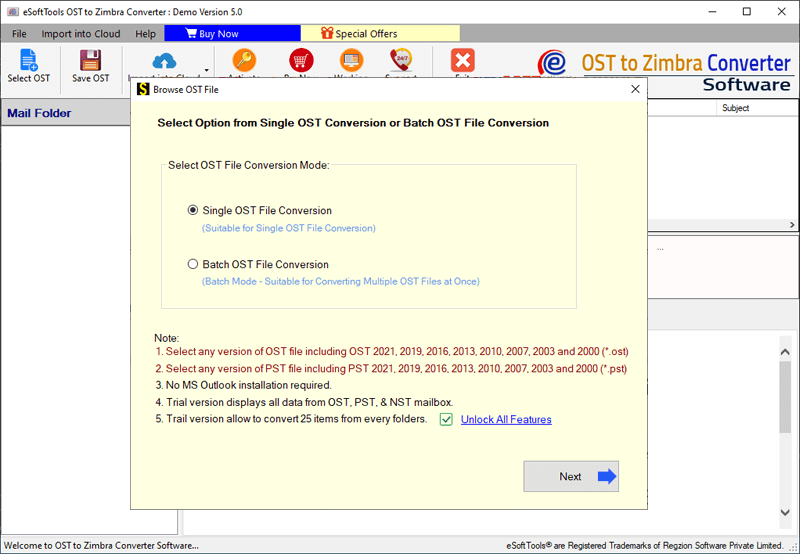
- Load the OST files into the software and click the Start Scanning button.
- Preview OST files/folders containing emails, contacts, calendars, tasks, notes, etc. and select the needed files/folders for conversion.
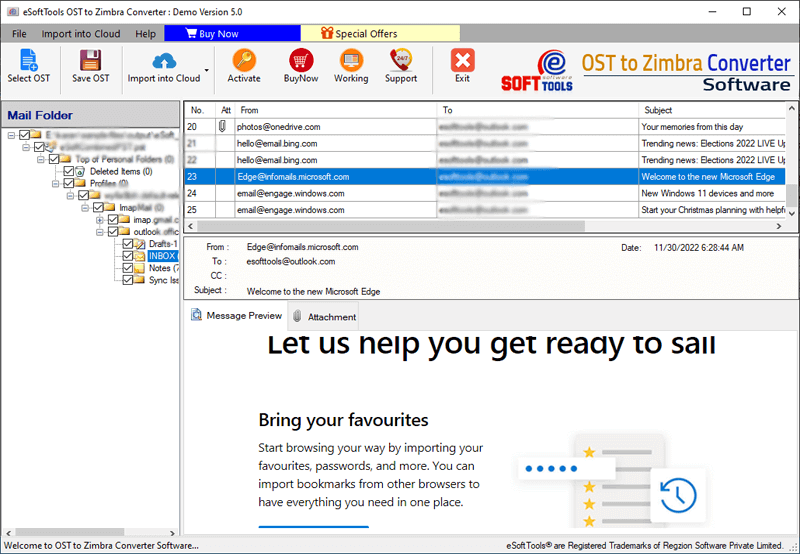
- Click on the Convert button on the above menu bar and choose the option Export to Zimbra TGZ for the conversion options list.
- If you want to apply the email filter and Naming convention options, you can.
- Press the Browse button and choose the location where you want to save the converted PST files.
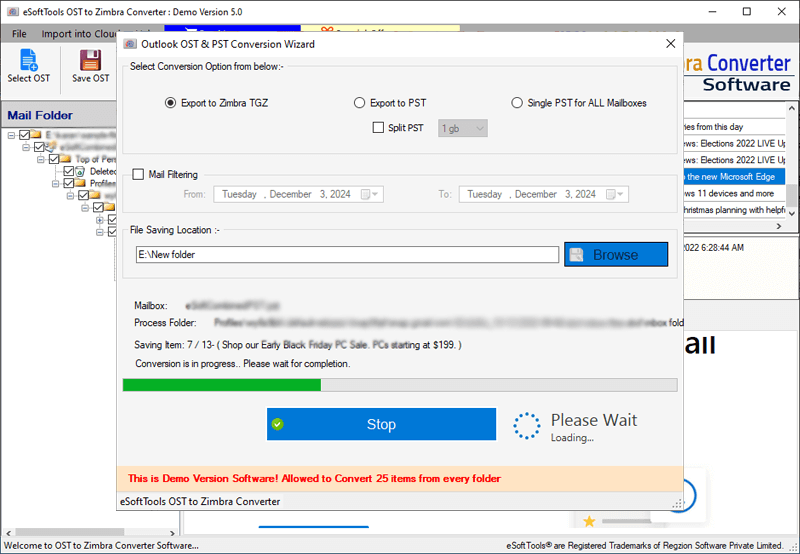
- Click the Convert button and begin the Ohttps://www.esofttools.com/download/esoft-osttozimbra.exeST to PST file conversion process.
Conclusion
After reading this blog, you can easily convert OST to Zimbra Mail Client with the automated method. The method described above is an easy and reliable method that helps you to do conversions. With this OST to Zimbra Converter Software, you can migrate OST files to cloud-based applications like Gmail, Yahoo Mail, Office 365, Outlook.com and IMAP servers.


No Comments yet!