Do you want to know how to migrate Office365 email to IMAP-based email apps? If yes, read this article to find your answer. Here, we will explain the complete process of migrate Office365 emails to IMAP accounts.
Overview
As one of the most popular cloud-based services, Microsoft Office 365 lets users access Office suite applications through a web browser. It includes Outlook, Excel, Word, PowerPoint, and all other MS Office applications.
As part of the Microsoft Office 365 service, Outlook365 provides an online version of the Outlook desktop app. This allows users to manage their email accounts across different devices and locations simultaneously.
Besides Outlook 365, there are many other webmail applications available online based on the IMAP protocol. For various reasons, users prefer to transfer their emails from Outlook 365 to IMAP-based email apps.
Consequently, those users require a dependable solution for migrating Office365 emails to IMAP accounts.
Also Read:- How to migrate emails from Office 365 to Zoho Mail?
Method to Migrate Office 365 Emails to IMAP Account
eSoftTools Office365 to IMAP migration software enables direct email migration from an Office365 mailbox to an IMAP account. This automated tool allows for the transfer of mail folders from an Office365 account to all IMAP-based mail apps. It completes the transfer process in a few clicks, providing users with instant results. Furthermore, the software completes the migration without any errors or issues.
How to Migrate Office365 Emails to IMAP accounts?
- Run the software and select Office365 from the list of email applications.
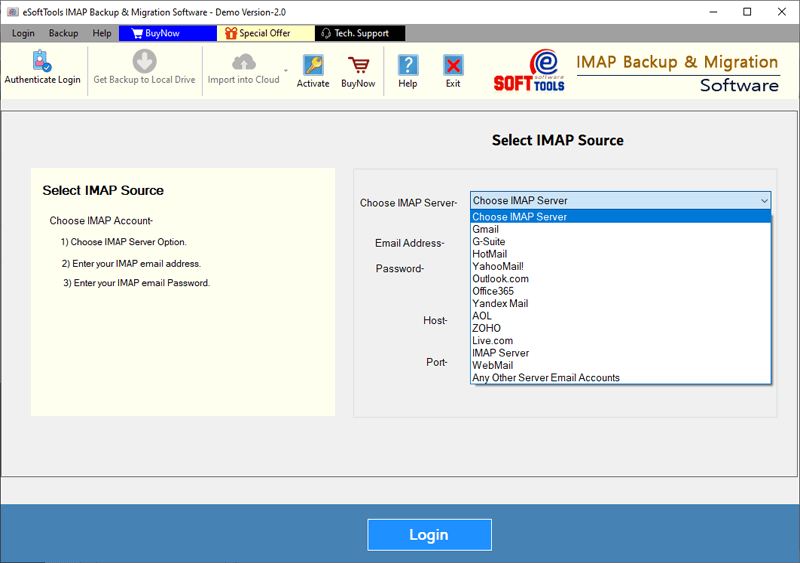
- Enter the email address of your Office3565 account and click Login.
- Sign in to your Office365 account and load all of its mail folders.

- Pick the required mail folders and click on the ‘Import to Cloud’ button.
- Choose the Import to IMAP account option and click Next.

- Provide your IMAP account information, including email address, password, port, and hostname.

- Press the Convert button, log in to your IMAP account, and start migrating.
Key Features of Office365 to IMAP Migration Tool
- Supports users in migrating Office365 mailboxes to all IMAP-based mail clients.
Allows you to export emails, contacts, calendars, and other Office 365 mailbox items. - This tool supports previewing Office365 mailbox folders and selective exporting.
- Uses mail filtering to export emails from Office365 mailboxes for specific dates.
- Enables users to migrate their Office365 emails along with all relevant data.
- Transfers selected Office365 account folders, preserving their hierarchical structure.
- Completes the migration process without requiring any additional applications.
- The graphical interface is clean and intuitive, making it easy for anyone to use.
- This is available on all versions of the Windows operating system, including Windows 11, 10, 8.1, 8, 7, XP, Vista, and older.
Conclusion
Nowadays, a large number of users are considering transferring Office365 email folders to other IMAP-based email apps. There are many reasons for this. In this article, we’ve described the easiest way to migrate Office365 Emails to IMAP accounts. Users can easily initiate an Office365 to IMAP email migration by following the steps above. Try the demo version of the Office365 to IMAP Migration tool now for a quick, free migration trial.


No Comments yet!