Are you looking to extract email addresses from NSF files? If yes, then you landed on the right page. In this blog, we have outlined an automated method for extracting email addresses from NSF files.
Overview
HCL/IBM/Lotus Notes and Domino Server use NSF files to store emails, contacts, calendars, tasks, and appointments. It is also known as Notes Storage Facility. Sometimes users need to extract email addresses from emails stored in the NSF files. There are no tools available for this complex task. To resolve this issue, we have written a trusted and professional solution to do this task.
Reasons to extract email addresses from NSF files
- Extract Email Addresses from NSF files helps users in building a contact list that can be used to send newsletters, announcements, and other communications with your audience.
- It helps in updating your contact list and helps in maintaining a current and accurate contact list.
- Extracting email addresses is essential when you are switching from Lotus Notes/HCL Notes to other email clients like Outlook, Mozilla Thunderbird, etc., to transfer your contact list and ensure a smooth migration.
- By extracting email addresses from NSF files to CSV, HTML, or TXT format, you can use them in other software easily.
Automated solution to extract email addresses from NSF files
With the eSoftTools NSF email address extractor tool, you can easily extract email addresses from NSF files. With a few steps and clicks, you can easily extract email addresses from NSF files without any hassle. Moreover, the graphical interface is user-friendly, so both technical and non-technical people can use it easily.
Also Read:- How to Convert NSF to PST Outlook Files?
Key features
- Extract and save email addresses in 3 different file formats: TXT, HTML, and CSV.
- Provides different options to extract email addresses by choosing from the email address fields (To, cc, bcc, From, or All).
- Enables to extraction of email addresses from Single or Multiple NSF files with a single process.
- Have an option of filtering emails according to Date by choosing Date Range (From and To) and extracting emails from the filtered Date.
- Provides the feature of extracting attachments(All or specific types) from Lotus Notes NSF files.
- Preview Lotus Notes/IBM Notes/HCL Notes NSF files and folders in the preview panel inside the software.
- Browse the location on your system to save the extracted email address file on your system.
- Consistent with all editions of Windows operating systems, like Windows 11, 10, 8.1, 8, and previous versions.
Step-by-step approach for extracting email addresses from NSF files
- Download and launch eSoftTools NSF email address extractor software on your PC.

- Press the Select NSF button and choose from the file conversion mode
- Select NSF file conversion: In this mode single NSF file is added for email address extraction.
- Bulk NSF file conversion: In this mode, multiple NSF files are added for email address extraction.

- Click the Next button and load the NSF files and folders in the software.

- Preview the NSF files and folders in the preview panel and select the needed files and folders for email address extraction.

- Press the Extract Email Address button on the menu bar, and the next window will open.

- Select the saving file type, such as TXT, HTML, or CSV.
- Select any one of the options from the Email filter criterion (To, cc, bcc, from, or All).
- Apply mail filtering and browse saving location from the given options.
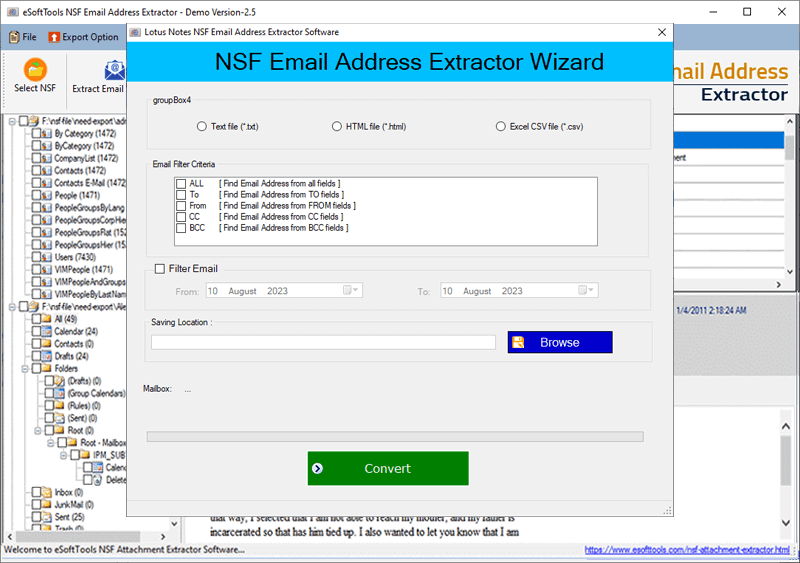
- Click convert and start the extraction of email addresses from the NSF emails.

Conclusion
The user needs to extract email addresses from NSF files in case of switching from Lotus Notes/ HCL Notes to another email client, which helps in migration. There few tools available to do this task. In this blog, we have explained the eSoftTools NSF email address extractor tool, which is a trusted and reliable tool. In case of checking the tool to know how it works, you can try the free demo version of the software.


No Comments yet!