Directly opening EML files in Lotus Notes is not possible. The reason for this is Lotus Notes does not support EML files because it supports NSF files to store data like emails, contacts, calendars, notes, tasks, to-do lists, etc. So, to import EML files in Lotus Notes you have to do EML to NSF file conversion. If you are looking to convert EML to NSF then this blog is for you. Here we have discussed the topic of How to extract data from EML to NSF.
Overview
EML is the file format that is supported by 30+ email clients to store email messages separately. Email clients like Windows Live Mail, Apple Mail, Mozilla Thunderbird, and Microsoft Outlook support EML file format to save emails.
Sometimes a situation arises when the user wants to open EML files in Lotus Notes but is unable to do that because Lotus Notes supports NSF files to import/export emails and other data items. So to import EML files to Lotus Notes we need to do a conversion from EML to NSF.
So when you need to migrate from EML supported email client to Lotus Notes you need to do conversion from EML to NSF.
Quick solution to extract data from EML to NSF
The eSoftTools EML to NSF converter software is the best and most reliable tool for converting EML files to NSF files. It can convert bulk conversion of EML files to NSF files. It allows the preview of all the files and folders of the EML file in the preview panel. After conversion user can access NSF files in the Lotus Notes and Domino Server.
Also Read:- How to Convert EML to MSG File in Bulk on Windows?
How to extract data from EML to NSF
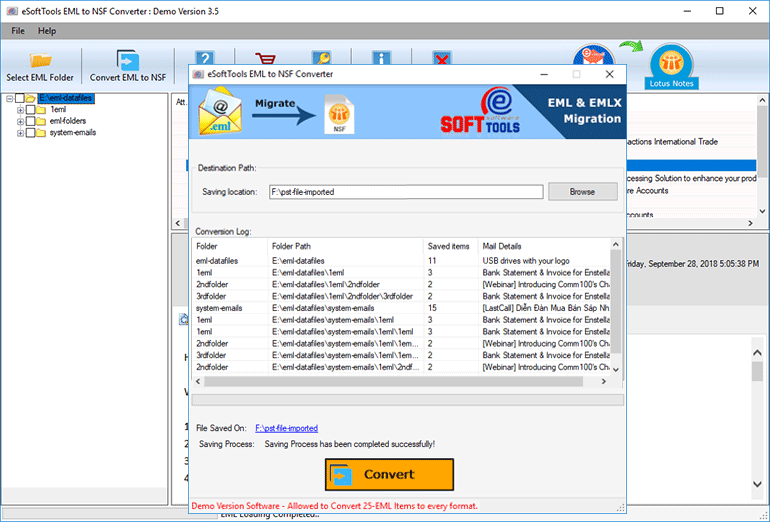
- Download and install eSoftTools EML to NSF converter software on your system.

- Click on Select EML folder and click the Next button to add files and folders in the software and start scanning.

- In the preview panel, you can view EML folders and can select the EML files to be converted into NSF files.

- Click the convert button and start the conversion process from EML to NSF.
What are the benefits of using EML to NSF converter?
- Extract data from EML to NSF in just a few easy steps.
- It has a user-friendly graphical interface that allows technical and non-technical users to use it easily without technical expertise.
- Allows to import EML files of any size without any restriction.
- Maintains all the meta properties emails like To, cc, bcc, subject, and Date while converting from EML to NSF.
- Supports to convert EML files of all email clients like Apple Mail, Mozilla Thunderbird, Microsoft Outlook, etc.
Conclusion
We can tell you that if you use this software you can successfully convert EML to NSF file with 100% accuracy. The above-mentioned software is completely secure and provides satisfying results. It can convert emails of EML files with attachments to NSF files. In the demo version, you can convert 25 emails from each folder of EML files to be converted to NSF files.


No Comments yet!