Do you need to extract contacts from an OST file but don’t know how to do it? If yes, then you don’t need to worry and stay tuned to this page. In this blog, we have explained methods to extract contacts from the OST files.
User Query: Hello, I am running a small business, and I receive many emails from customers. I store important customer contact information in the contacts of Outlook and have made a contact list. Now, due to corruption of OST files, I am not able to access emails and contact information. Can you suggest a method for extracting contacts from the OST file?
Overview
Microsoft Outlook creates two types of OST (Offline Storage Table) and PST (Personal Storage Table) files depending on how the email account is configured.
When you configure an Outlook account using IMAP and Exchange Server, it will create an OST file. It stores data items like emails, contacts, calendars, tasks, notes, etc, and allows access to data offline. It synchronises with Exchange Server and updates according to Exchange Server.
Also Read:- How to Extract Emails from OST file?
Why extract contacts from the OST file?
- As OST files are prone to corruption so it is better to extract contacts from the OST file.
- When you need to access the OST file contacts, and the Exchange Server is not working, then extracting of contacts is necessary.
- By extracting contacts from the OST file, you can use them to switch to another email client.
- Extracting OST contacts can help for backup purposes and sharing purposes.
Smart Solution to extract contacts from OST file
With the eSoftTools OST to PST converter software, you can extract contacts from the OST files to vCard files in bulk. With this tool, you can convert OST files to other file formats like PST, EML, MSG, EMLX, HTML, MBOX, etc. Moreover, users can migrate OST files to cloud applications like Gmail, Yahoo Mail, Office 365, Outlook.com, and IMAP email accounts.
How to extract contacts from an OST file?
- Download, install, and launch the eSoftTools OST to PST converter software on your Windows PC.
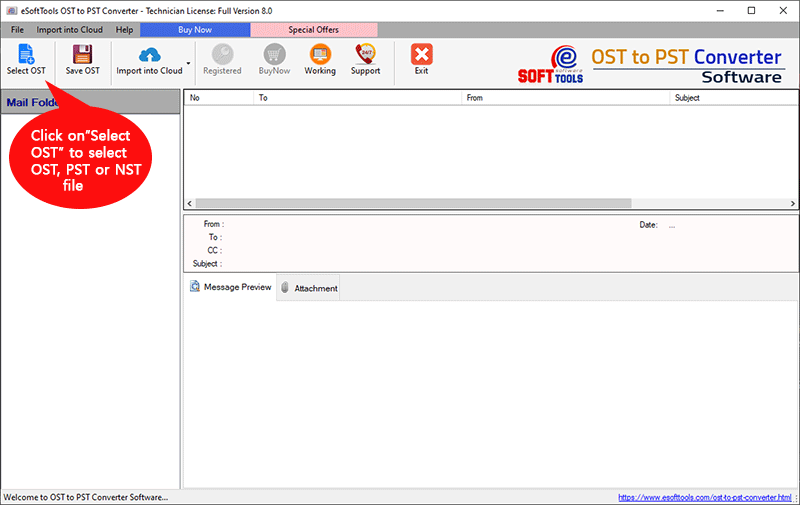
- Press the Select OST button on the above menu bar and add OST files & folders into the software.
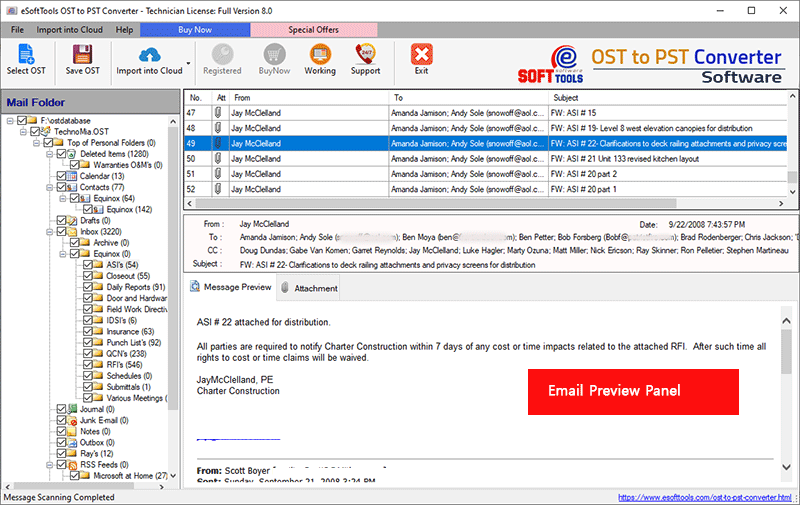
- Preview OST files & folders in the preview panel and select OST contacts and files & folders to be exported.
- Click on the Save OST button on the above menu bar and choose conversion options as Export to vCard.
- Apply the Mail filtering feature if you want to filter emails according to Date.
- Browse the saving location where you want to save the vCard file on your Windows PC.

- At last, click the Convert button and start the conversion process from OST to vCard.
Benefits and features of the OST to PST converter software
- In bulk converts Outlook OST/PST/NST files into other file formats.
- Converts all data items of the OST file, like emails, contacts, calendars, tasks, notes, etc, to other file formats.
- The email filter feature allows users to filter emails according to Date by specifying a Date Range( From and To).
- Easily splits large-sized OST files into multiple smaller PST files.
- Provides a naming convention feature that saves emails with unique names based on Subject/Date/From.
- Comfortably runs on all editions of the Windows Operating System, like Windows 11, 10, 8.1, 8, 7 & below editions.
FAQs
Can I extract contacts from corrupted OST files?
Yes, with the eSoftTools OST to PST converter software, users can extract contacts from corrupted OST files into a vCard file.
Can I convert multiple contacts from multiple OST files to a vCard file at a single time?
Yes, in the eSoftTools OST to PST converter software, you can add multiple OST files into the software in the bulk OST file conversion mode.
Can I selectively export contacts from OST files to other file formats?
Yes, it loads all the files & folders of the OST files and previews them in the software. You can selectively select the contacts, files, and folders that are required to export.
Can I run this software on Windows 7 & below versions?
Yes, this software is compatible with all editions of the Windows Operating System, like Windows 11, 10, 8.1, 8, 7 & below versions.
Can I use the demo version of the software to check how the software works?
Yes, the company has provided a free demo version in which you can convert 25 data items from each OST folder to other file formats.
Can I extract contacts without installing Microsoft Outlook on my computer?
Yes, this software works without the installation of Microsoft Outlook on your system. It only requires an Outlook OST/PST/NST file, and contacts can be recovered from it.
Conclusion
In this blog, we have explained an automated method to extract contacts from OST files. There are manual methods also available, but they require Microsoft Outlook installation. The automated method is easy to use and extracts contacts from OST files in bulk without the installation of Microsoft Outlook.


No Comments yet!