There are many reasons why users need to export their WLM calendar to Outlook desktop. If you are facing the same problem then this blog post can help you. Here we will show you how to export Windows Live Mail calendar to Outlook desktop easily.
Overview
Windows Live Mail and Outlook also allow users to save or manage calendar events. With calendar management, users can easily set and manage their important events. Also, users can easily save dates of appointments, interviews, meetings, and many other events.
Windows Live Mail and MS Outlook both are manufactured by Microsoft. But MS Outlook is more trusted and popular among users as compared to Windows Live Mail.
Also Read:- How to Export Windows Live Mail to Outlook 365?
Smart Solution to Export Windows Live Mail Calendar to Outlook Desktop
To export Windows Live Mail calendar to Outlook desktop, users should use the eSoftTools Windows Live Mail Converter software. Users can easily export their WLM calendar to Outlook with the help of this effective tool and it can also convert WLM calendar files to Outlook PST, MSG, EML, EMLX and HTML file formats.
Key Features
- Export Windows Live Mail calendar to Outlook and other formats.
- With this software, you can import the WLM calendar into an existing Outlook profile and a new Outlook PST file.
- Migrate WLM mail folders directly to Office 365, Gmail, Yahoo, and other mail apps.
- Preview all calendar events with full details before conversion.
- Save WLM mailbox in two different modes, like “single PST”, “separate PST”.
- This software supports all new and old Windows editions.
Steps to Export Windows Live Mail Calendar to Outlook Desktop
- Download and launch the eSoftTools Windows Live Mail Converter software on your computer.

- Click on the “Select WLM Mailbox” button from the first screen of the software.
- Select one of the given options to add Windows Live Mail calendar files:- “Auto detect WLM profile”, “Select WLM profile folder”
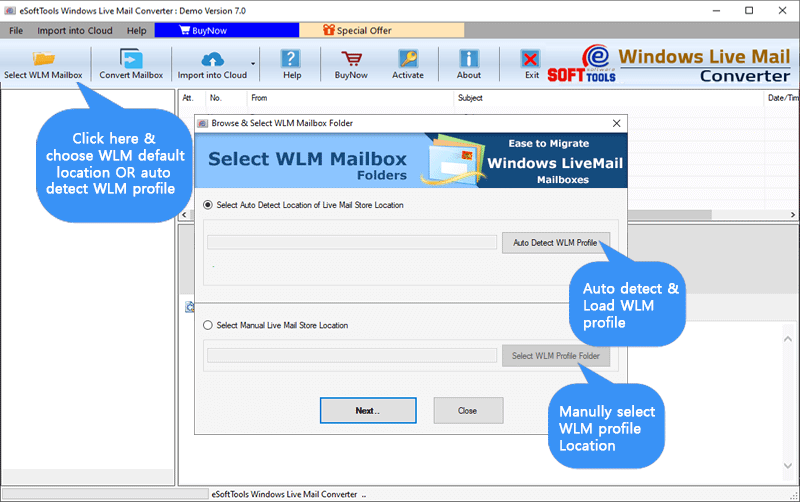
- After selecting and importing the files, click on the Next button and load all the calendar events.

- Now, preview the calendar items and select the required items, then press the Export button.
- Choose “Outlook PST file” or other conversion formats.
- Now choose the location where you want to save the resultant files and click on the Export button.

Conclusion
To export Windows Live Mail Calendar to Outlook desktop and help users, we have provided the best and safest solution through this article. Users can export WLM Calendar to Outlook desktop in a very easy way, and can also try the free demo of this software.


No Comments yet!