In this blog, we have outlined an automated method that enables the conversion of iCloud emails, contacts, calendars, and other data items to the PST file format. After export iCloud emails to PST file format, users can easily use them in any edition of Outlook 2019, 2016, 2013, 2010, 2007, 2003, etc.
Overview
iCloud Mail is a service provided by Apple to send and receive emails, similar to other service providers like Gmail, Yahoo, etc. It allows users to manage emails on Apple devices with the help of a web browser on iCloud.com.
PST is the file format used by the Microsoft Outlook email client to store emails, contacts, notes, tasks, etc.
Many users prefer to use Microsoft Outlook to manage emails rather than iCloud due to offline access, an easy graphical interface, and better email management.
Reasons to export iCloud to the PST file format
- PST file format is accessed in all versions of Outlook 2019, 2016, 2013, 2010, 2007, 2003, etc.
- Emails can be accessed offline in Microsoft Outlook, whereas to access iCloud emails internet connection is needed.
- In backup purposes PST files helps if there is a case of data loss.
- PST files can be exported to Exchange Server, Office/Microsoft 365.
Automated method to export iCloud to PST file format
With the eSoftTools iCloud Backup & Migration tool, you can easily back up iCloud emails and data to the PST file format. This tool allows users to back up iCloud data in different file formats, such as PST, MSG, EML, HTML, MHTML, EMLX (Apple Mac OSX file), MBOX( Folder-wise MBOX file), MBOX( Single MBOX file), PDF, and Thunderbird. Moreover, users can migrate iCloud emails and data to cloud applications like Gmail, Yahoo Mail, Office 365, Outlook.com, and IMAP email accounts.
Key features
- Easily export iCloud to PST File Format.
- Performs iCloud emails and other data backup and migration on Windows systems.
- Save individual iCloud emails in various file formats such as EML, EMLX, MSG, HTML & PDF.
- Export iCloud emails and data to Thunderbird’s default storage location.
- Preview iCloud emails, files & folders in the preview panel before conversion and migration.
- Can export and backup selected iCloud emails, files & folders according to your need.
- Completes the backup & migration process without any loss of data.
- Have an email filter option that filters emails according to Date.
- Maintains folder structuring and formatting during conversion and migration.
- Consistent with all editions of the Windows Operating System, like Windows 11, 10, 8.1, 8, 7 & below versions.
Also Read:- How to Backup iCloud Emails? Complete Guide
Steps to export iCloud to the PST file format
- Download, install, and launch eSoftTools iCloud Backup & Migration software on your Windows system.
- Enter iCloud account credentials like iCloud email address and Application Password.

- Click the Login button, and all iCloud mailbox files & folders will be added to the software.

- Choose the required iCloud mailbox files & folders that are to be converted to the PST file format.
- Choose Export options as Save in PST in the Backup options.
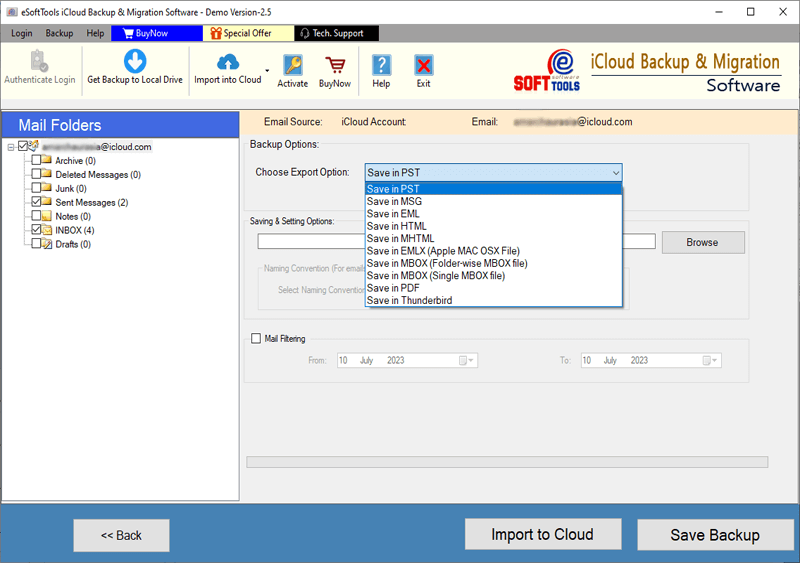
- Browse the saving location where you want to save the PST file on your computer.
- Apply the Mail filter and naming convention feature according to your requirements.

- Click the Save Backup button and conversion process will initiate.

FAQ
How to convert iCloud to PST?
- Launch the eSoftTools iCloud Backup & Migration software on your system.
- Add iCloud mailbox files & folders into the software.
- Preview iCloud mailbox files & folders and select files & folders.
- Choose the Export option as Save in PST.
- Browse the saving location and apply the mail filter feature.
- Click the Save Backup button to start the conversion process.
Can I preview and export selected iCloud emails to PST?
Yes, eSoftTools iCloud Backup & Migration software allows users to preview iCloud files & folders before conversion and have the option of selecting emails for converting to PST.
Conclusion
In this blog, we have explained the reasons and an automated method to export/backup iCloud mailbox in PST file format. There are manual methods also available, but they are lengthy and need technical expertise. However, we have described an automated method that is easy and simple. If you want to check that the software works, then you can try the free demo version of the software.


No Comments yet!