Although MS Outlook is the top pick of users to open email files, in some situations, users need to open PST files in a web browser like Google Chrome, Microsoft Edge, Internet Explorer, Opera Browser, etc. To open PST files in a web browser, you need to convert them into HTML/MHTML format. This is a challenging task to export HTML & MHTML from MS Outlook PST, and to solve this problem, we have written an automated method in this blog.
Overview
MS Outlook PST is a file format that stores emails, contacts, calendars, tasks, notes, etc. This file is created manually when a user wants to save and backup their data or transfer data from one computer to another.
HTML, also known as Hyper Text Markup Language, is used to create web pages and web applications. These files are easily opened in text editor software like Notepad and contain the code that runs on web browsers like Google Chrome, Microsoft Edge, Internet Explorer, Opera Browser, etc.
MHTML, also known as MIME HTML, is a web page archive file format. It contains the entire web page, including HTML code, images, CSS code, JavaScript and other files in a single file.
Read more-
Why to export HTML/MHTML from MS Outlook PST?
- Easy sharing: If you want to share a single email from a PST file, then converting and saving it to HTML/MHTML is a good option because HTML/MHTML files are easily shared.
- Easy editing: It is easier to edit emails in the HTML/MHTML files than in the PST files because HTML/MHTML files open in text editor software like Notepad.
- Good presentation and reading: The overall experience of reading an HTML/MHTML file in web browsers is good because it uses tags, paragraphs, images and headings.
- Cross-platform compatibility: The HTML/MHTML files can be compatible with desktop computers, laptops, tablets and Android phones.
Automated method to export HTML/MHTML from MS Outlook PST
With eSoftTools Outlook PST recovery software, you can easily convert PST files to HTML and MHTML file formats. This is the smartest and powerful solution to export HTML/MHTML from MS Outlook PST. Moreover, this tool allows the conversion of PST files to various other file formats like EML, EMLX, MSG, MBOX, NSF, HTML, Zimbra(.tgz) etc and allows migration of PST files to different cloud-based applications like Gmail, Yahoo Mail, Office 365, Outlook.com and IMAP servers.
Key features
- Capable of converting PST files into multiple file formats such as MBOX, MSG, EML, EMLX, HTML, etc.
- Provides a preview of PST files and folders inside the software and can select the files and folders that you want to convert into other file formats.
- Allows the splitting of large PST files into smaller PST files with the split feature.
- Enables working with all Outlook editions up to 2019 (32/64 bit).
- Consistent with all editions of the Windows Operating System, such as Windows 11, 10, 9, 8.1, 8, 7, Vista, XP and older versions.
- Repair corrupt PST files and recover data items such as emails, calendars and contacts.
Steps to convert PST to HTML/MHTML
Download and launch eSoftTools Outlook PST recovery software in your system.
Click on the Select PST button from the menu bar.

- Now choose the PST conversion mode.
- Single PST file conversion– You can load a single PST file in the software in this conversion mode.
- Bulk PST file conversion– You can load multiple PST files in the software in this conversion mode.
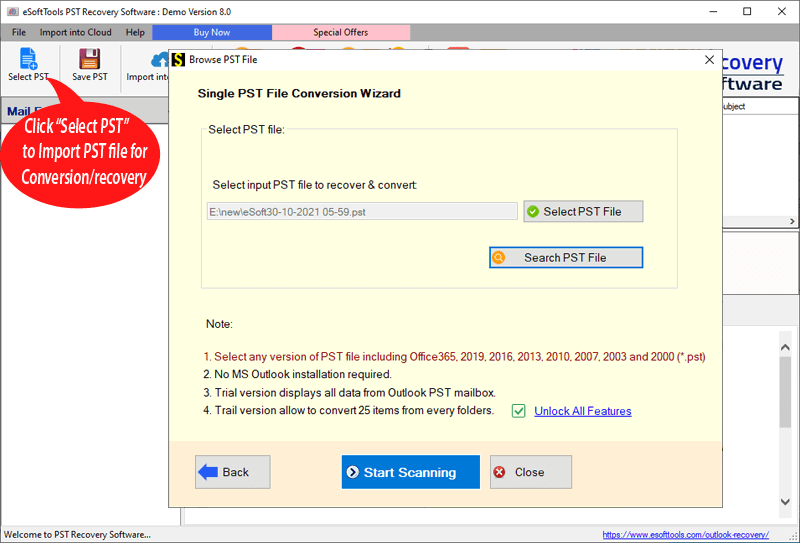
Select the file and click the Next button to start the scanning process.

Get the preview of files/folders of the PST file, and select the PST contacts files and folders that you want to convert.
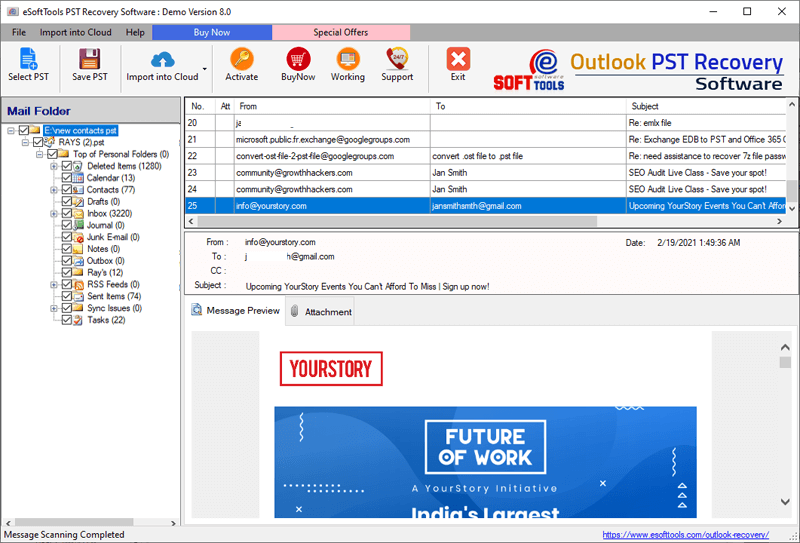
Click on the Save PST button on the above menu bar, and the Outlook PST conversion window will open.

Click the Convert button to start the conversion of the PST files to HTML/MHTML.
Conclusion
Many users are in need of converting PST files to HTML/MHTML format, but don’t know how to do it. In this blog, we have explained the best automated method step by step. If you have any doubts in your mind, you can try the free demo version of the software and check how the software works.


No Comments yet!