Do you want to merge multiple MSG files into a single PST file or export Outlook items from MSG files to PST? If so, this article will provide you with an easy way to do so. Here, we’ll show you the best way to convert multiple MSG files to PST without Outlook.
Overview
MS Outlook is a desktop email client for Windows users. The app has many advanced features. A major feature is saving user profile data locally.
Users can save their email profile data in various file types offered by Outlook. MSG is among the file formats supported by Outlook for securing user data. This file makes it possible to save every Outlook item individually.
MSG files allow users to save emails, contacts, calendars, and other Outlook items. It is also very easy to import and open MSG files within Outlook.
Also Read:- How to Convert MSG to EMLX File Format?
Reasons for convert multiple MSG files to PST without Outlook?
- Converting MSG files to PST format allows for a more efficient migration of your Outlook emails and data when switching to a new computer or a different email client.
- If you convert MSG files to PST, you can archive Outlook profile data and organize and store email data more effectively.
- Multiple MSG files are an inefficient data management method. Converting them into a single PST file enables the consolidation of all relevant emails in one location, streamlining data management.
- PST files simplify the process of sharing email data with colleagues or team members. You can share several emails or whole mailboxes in one file by converting MSG files to PST.
Quick solution to convert multiple MSG files to PST without Outlook
You can export or convert MSG files to PST files in a few ways, but they all need Outlook. So, the best option for users is to use automated software like eSoftTools MSG to PST Converter Software. With this tool, you can convert MSG file to PST file without Outlook. Convert many MSG file to PST file all at once. Convert every type of MSG file with one process.
How to convert multiple MSG files to PST without Outlook?
- Follow the following steps and convert MSG files to PST files in bulk with eSoftTools MSG to PST Converter software.
- Download and run MSG to PST Converter on your computer.

- Click on the “Select MSG File/Folder” button from the first screen.
- Choose how to add the MSG file from the options – Select MSG folder, Select MSG files.

- Import MSG files from the chosen folders and click Next.
- View Outlook items from the selected MSG files, then pick the folders/files you need.

- Select the MSG files/folders, then click the Convert MSG Files button.

- Select Export to PST from the Export option and apply other settings: – Add Name, Add Store File, and Password.
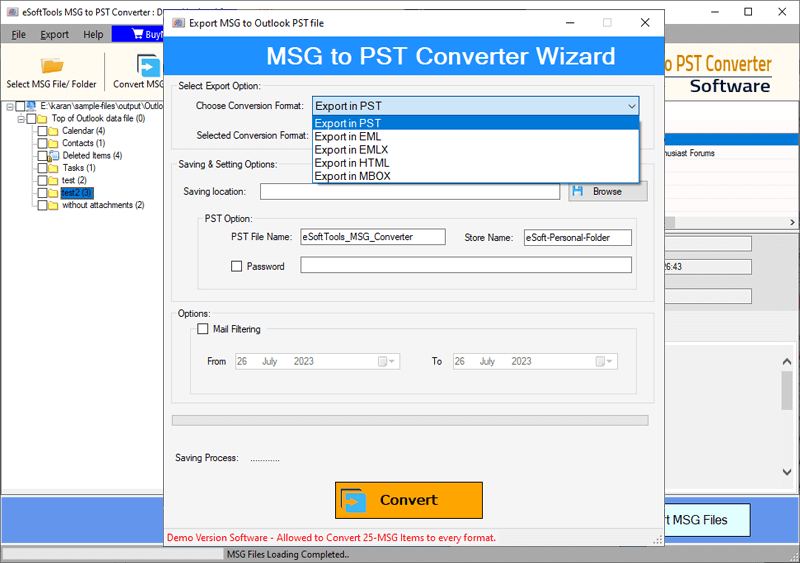
- Select a location to save the resulting PST files and utilize the mail filter option.
- Finally, click on Convert and start the process of converting MSG to PST.

Features of the MSG to PST Converter software
- Convert multiple MSG files to PST files. Export data from multiple MSG files to a single PST file.
- Apart from PST, it also converts MSG files to 4 other conversion options, including EML, EMLX, HTML, and MBOX.
- Easily preview all Outlook items from MSG files, showing the original details.
- It is also possible to convert only one MSG file at a time with the help of this software.
- Enable password protection for the new PST file generated during MSG to PST conversion.
- It is capable of working on computers with any version of the Windows operating system, including Windows 11, 10, 8.1, 8, 7, XP, Vista, and older versions.
Conclusion
Many Outlook users need to convert multiple MSG files to PST without Outlook for various reasons. The main reasons include data merging, archiving, and other tasks. The best option for this conversion is to use a third-party conversion tool – eSoftTools MSG to PST Converter. This tool allows you to easily convert MSG files to PST with minimal technical knowledge.
FAQ
Will this tool allow users to convert MSG files containing Outlook contact items?
Users can convert MSG files containing any Outlook items, including emails, contacts, calendars, journals, tasks, notes, etc.
Does it support opening and viewing data from MSG files before conversion?
Users can view all the items from MSG files to Outlook inside the preview panel of the software before starting the conversion process.
Apart from Outlook PST, does it provide any other file format facility to convert MSG?
Apart from PST, with the help of this single software, users can convert MSG files to 4 other file types, including EML, EMLX, HTML, and MBOX.
Can I convert more than 1000 MSG files in a single process using this tool?
Users can convert unlimited MSG files to PST and other available conversion formats at the same time without any restrictions.


No Comments yet!