Are you looking to convert EML files to CSV format? If yes then you are on the right page. In this blog, we have written an automated method to convert EML to CSV in batch.
Overview
CSV, also known as Comma-Separated Value, is a text file that stores data in table format. It stores each value in a row separated by a comma and uses newlines for each record.
CSV files are used to store contacts and other information, and they can be opened in Microsoft Excel.
EML stores single email messages with attachments in a file and is supported by many email clients, such as Mozilla Thunderbird, Apple Mail, and Microsoft Outlook.
Smart Solution to convert EML to CSV
The smart solution for converting EML to CSV files is to use eSoftTools EML to CSV Converter software. This advanced and reliable software converts EML files to CSV format with a few clicks. Moreover, it allows users to preview EML emails in the preview panel and select the files and folders to be converted to CSV format.
Also Read:- Free EML file Viewer Download
Key features of EML to CSV Converter software
- Convert EML to CSV in batch with just a few easy steps.
- An amazing tool to export EML emails with attachments to CSV(Comma Separated Value) format.
- Allows the conversion of single and multiple EML files at a time.
- Works as a Free EML viewer software to view all emails with attachments inside the software.
- Easily export EML emails while maintaining all the meta properties of email like To, cc, bcc, subject, Message body, and from.
- Available with additional features such as Extract Phone numbers and Extract email addresses from EML emails.
- Provides the feature of mail filtering through which users can filter emails according to Date by mentioning the Date Range(From and To).
- Direct allows EML emails to cloud-based applications like Gmail, Yahoo Mail, Office 365, and IMAP.
- Provides conversion of EML files to other formats like PST, MSG, HTML and EMLX.
Step-by-step approach to convert EML to CSV
- Download and install eSoftTools EML to CSV converter software on your system.
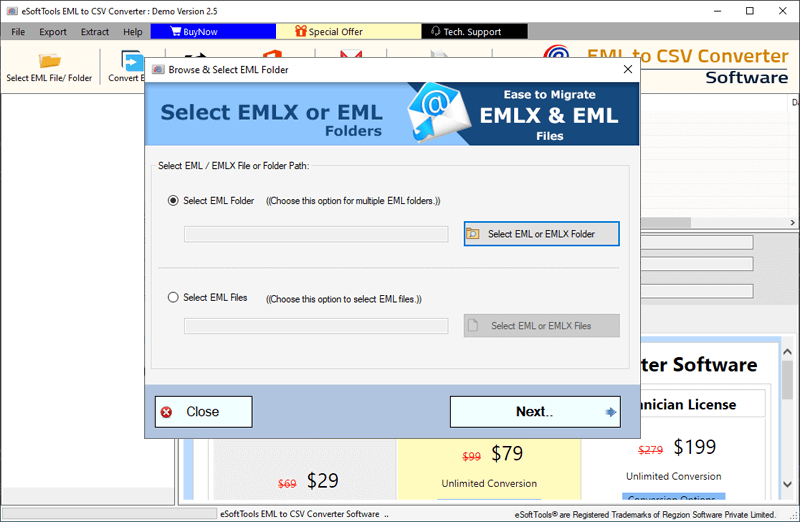
- Launch the software and click the Select EML file/folder button on the above menu bar to add EML files and folders.

- Choose any one of the options according to your requirement- Select EML file or Select EML folder.
- Get a preview of EML files and folders in the preview panel and select the files and folders to be converted to CSV format.
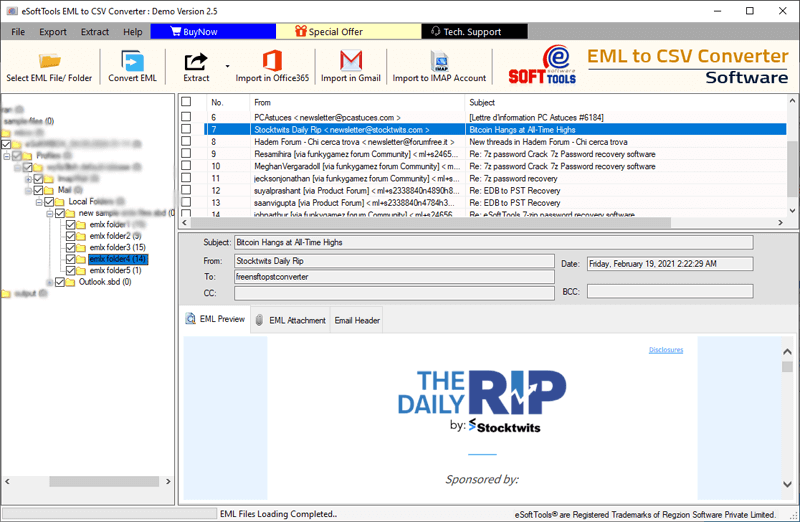
- Click the Convert EML button and the conversion window will appear on the screen.
- Choose the Export to CSV option from the drop-down list.

- Apply settings- Mail filtering, file saving location selection and save attachments according to your requirements.
- At last, click the Convert button and start converting EML emails to CSV format

Conclusion
This blog describes an automated method to convert EML to CSV in batch format. The automated method described here is professional and does conversion without any data loss and with 100% accuracy. You can use the demo version of the software that allows you to convert 25 EML files from each folder to CSV format and if you get the desired results you can purchase the license.


No Comments yet!