Have you tried to Convert EDB to EML Format on Windows but didn’t achieve the desired results? This blog post is for you. In this blog, we have explained the automated method to convert EDB to EML files.
What is a Microsoft Exchange Server?
Microsoft Exchange Server is a mail and calendaring server developed by Microsoft. Exchange Server integrates with Microsoft Outlook and other email clients, providing enterprise-level email hosting and collaboration features. Microsoft Exchange Server uses EDB files to store all the mailbox data.
What is an EML file?
An EML file is an email message saved in the Electronic Mail (EML) format, typically used by Microsoft Outlook, Windows Mail, Mozilla Thunderbird, and other email clients. It is a standard file format that stores an individual email message along with its attachments, metadata, and headers.
Reasons to Convert EDB to EML Format on Windows
- EML files can be opened individually without requiring Microsoft Exchange Server.
- EML files are easily sharable and can be transferred without exporting the entire mailbox.
Advanced solution to convert Exchange Server Mailbox EDB to EML
The best and most advanced solution to Convert EDB to EML Format on Windows is the eSoftTools Exchange Server Database Recovery Tool. It is a powerful software that converts EDB to EML files with a few clicks. Users can convert in bulk EDB to EML files without any size restriction. The built-in features of the software easily do conversion and migration of EDB files to various file formats.
Also Read:- How to restore the Exchange 2010 database from the EDB file?
How to convert EDB to EML Format on Windows
Download and install eSoftTools Exchange Server database recovery tool software in your system.
Click on the Add file button to load the EDB file into the software for conversion.

In the next window apply these settings: –
Click Browse or Find EDB File to insert the EDB file. Select a temporary location by clicking Browse.
Select the version of Exchange Server that contains your EDB file.
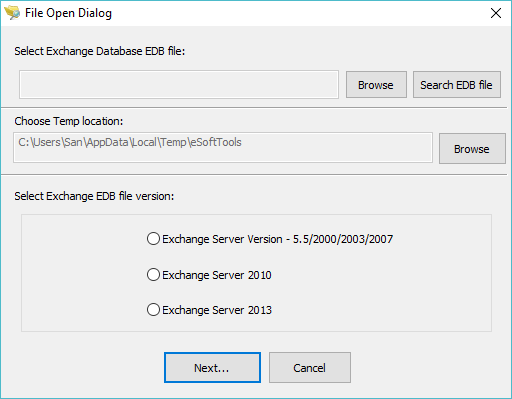
Load the required EDB files/folders for conversion in the software.

Preview the files/folders of the EDB user mailbox in the preview panel and select the files/folder.

Choose EML in the conversion option from the list of options.
Browse the destination path of the file where the EML file is to be saved.

Apply the email filter option if you want to apply and filter emails according to Date.
click on the Start Export button and start the conversion process of EDB to EML files.

Benefits and features of the Exchange Server Database Recovery tool
- Without restriction, you can add EDB files of any size.
- It can convert EDB files into other file formats.
- It allows the splitting of large-size PST files into multiple small-size PST files to ease the handling of large-size PST files.
- Provides the facility to preview emails, contacts, calendars and tasks of the EDB file in the tree structure and view in the preview panel.
Conclusion
In this blog we have explained the reasons and automated solution to convert EDB to EML files. Convert EDB to EML Format on Windows is not a complex task if you follow the right solution. The advanced features of the software will ease your task and help you in future cases if you want to do conversion in other file formats.


No Comments yet!