How to backup and restore Outlook OST files? Using Regzion OST Converter Software
Regzion OST Converter is a powerful and user-friendly tool created to help users backup and restore Outlook OST and save it into PST (Personal Storage Table) format. This feature becomes essential when Outlook profiles are damaged, the Exchange Server is unavailable, or when you’re migrating data to another system or Outlook account.
In addition, the software includes a simple, step-by-step interface that allows even non-technical users to perform conversions safely and efficiently.
Furthermore, for corrupted or damaged Outlook OST files, Regzion OST Converter Tool offers a reliable solution. Consequently, it scans inaccessible OST files and restores their contents to a healthy, accessible format.
Operating independently of Outlook, it supports OST files from all Outlook versions, making it suitable for both home users and businesses migrating between Outlook environments.
Read also- How to Convert OST to PST File?
Key Features of Regzion OST Converter
Multiple Format Conversion Options
Convert OST files into multiple formats including PST, MSG, EML, MBOX, EMLX, PDF, and HTML. This ensures compatibility with various email clients such as Outlook, Thunderbird, Apple Mail, and Windows Mail, giving you complete flexibility during migration.
Batch Conversion for High Efficiency
Moreover, convert multiple OST files in a single operation. This feature is ideal for IT teams, system administrators, and businesses managing large-scale data migrations.
Advanced Preview Option
Before converting, users can view complete mailbox data including emails, attachments, contacts, calendars, tasks, and notes. Additionally, each email retains its original formatting for easy verification.
Maintains Folder Hierarchy and Structure
The software preserves the original folder structure during the entire conversion process, allowing users to navigate the data just as it appeared in Outlook.
Recovers Corrupted and Orphaned OST Files
Even if OST files are corrupted or disconnected from Exchange, the software can recover the entire mailbox, ensuring no data is lost during conversion.
Works Independently of Outlook and Exchange
In fact, you don’t need Outlook or an Exchange connection to perform the conversion. Instead, Regzion OST Converter works completely on its own, making it suitable for offline data recovery.
Versions Available
Demo Version – For Testing and Evaluation
- Helps users verify data accuracy and compatibility before purchasing the full version.
- Scans and previews all recoverable items from OST files.
- Allows limited saving per folder (for example, 25–30 emails).
Full Version – For Complete Functionality
- Includes license options for both individual and corporate users, along with regular software updates and technical support.
Moreover, the software removes all saving restrictions for unlimited data recovery and export.- Provides full access to every available export format (PST, EML, MSG, HTML, PDF, MBOX, and others).
Steps to Backup and restore Outlook OST Files
Step 1: Install and launch the software
First, download and install Regzion OST Converter from the official Regzion Software website. Once installed, launch the application using the desktop shortcut or Start menu. Then, the main interface displays options to add OST files and choose your desired output format.
Step 2: Add the OST file
Next, click “Add File” or “Add OST” to browse your system and locate the OST file. Then, select the file and load it into the tool.
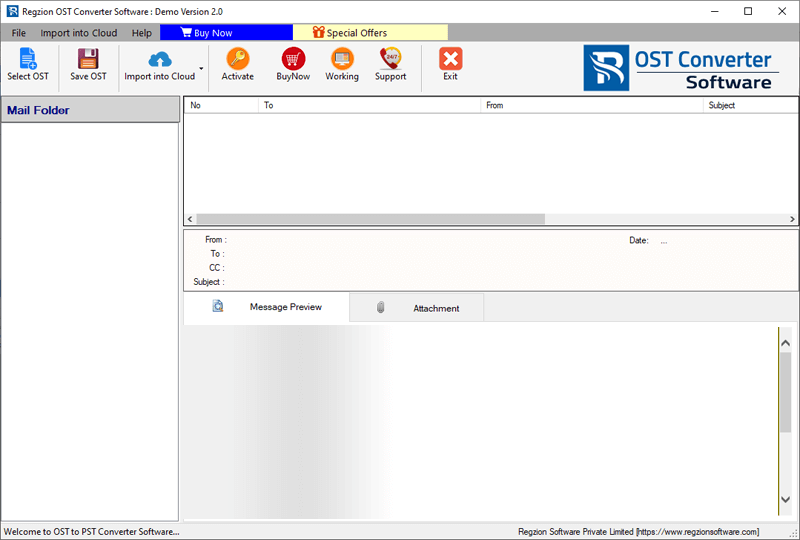
Step 3: Scan Outlook OST Data
Scan Outlook OST file data instantly
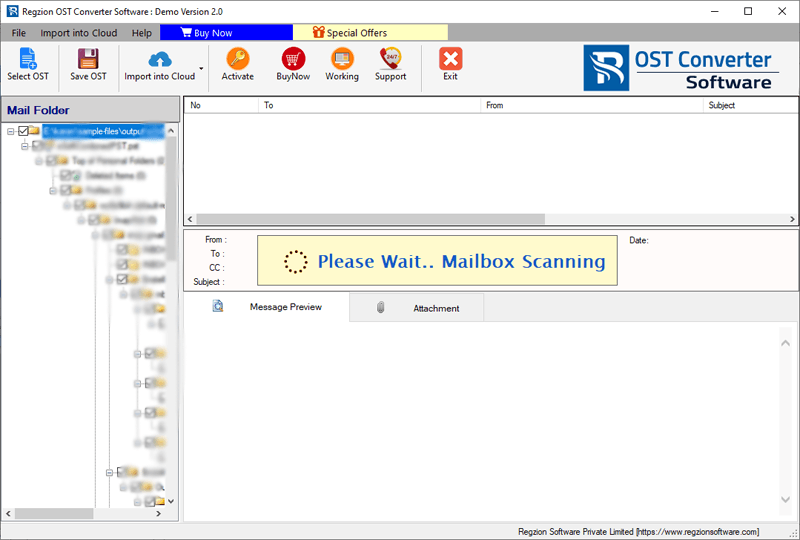
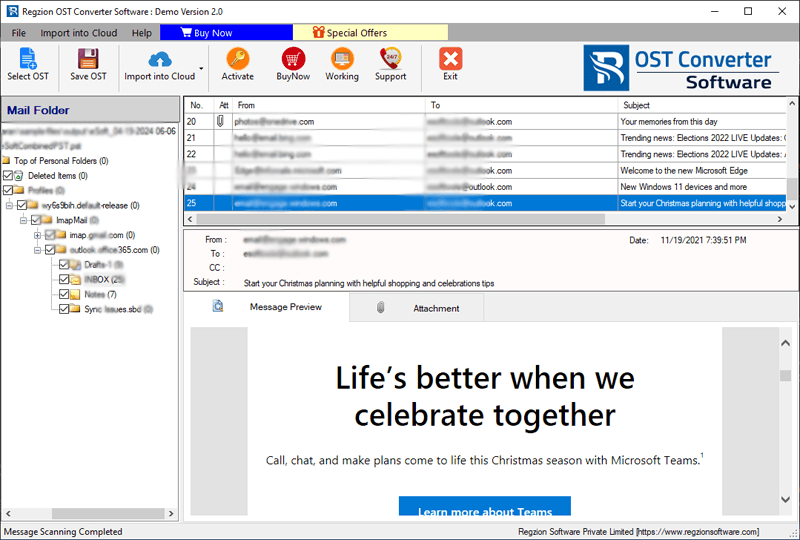
Step 4: Preview mailbox data
After scanning, the software displays a tree structure with all mailbox folders such as Inbox, Sent Items, Drafts, Contacts, Calendars, and more. You can preview each folder in detail to verify emails, attachments, and other data before exporting.
Step 5: Begin the conversion
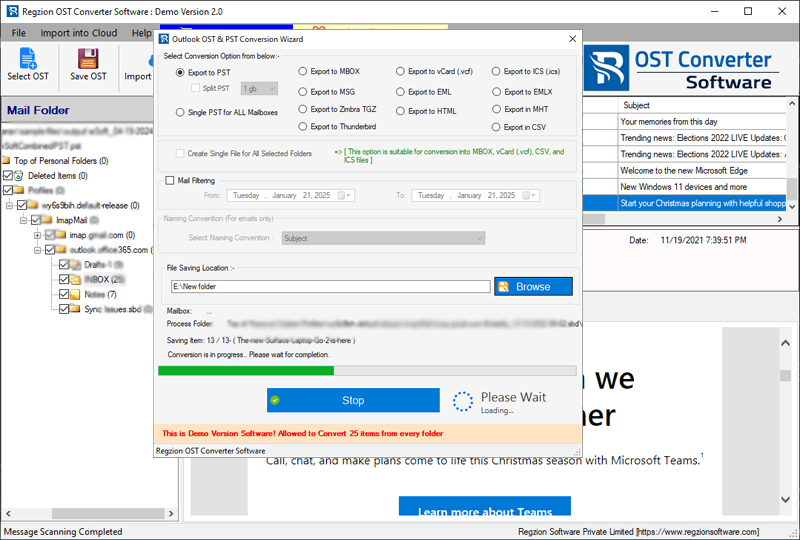
Finally, click “Convert” to start exporting data from OST to PST. Select conversion option from below:
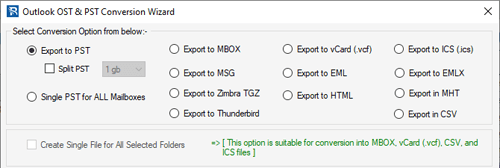
Step 5: Start the conversion
After all the selections, click on Ok button to start the conversion.
Frequently Asked Questions (FAQ)
Ans. Regzion OST Converter is a professional software utility designed to convert Outlook Offline Storage Table (OST) files into Personal Storage Table (PST) format. It helps users easily access mailbox data when Outlook profiles are damaged, Exchange isn’t available, or data migration is required.
Ans. Yes. The Regzion OST Converter includes a batch conversion feature that enables multiple OST files to be processed simultaneously, saving time and effort during large-scale migrations.
Ans. Yes. The tool functions independently and does not require a connected Outlook profile or Exchange Server. You can perform conversions even in offline or disconnected environments.
Ans. Absolutely. Users can preview emails, attachments, contacts, calendars, and other mailbox content before initiating the export process to ensure data accuracy.
Ans. Yes. The software preserves the complete folder hierarchy, keeping all emails, subfolders, and items in their original structure during and after conversion.
Ans. Yes. Regzion OST Converter is equipped with a built-in recovery module that can extract data from corrupted, damaged, or orphaned OST files without data loss.
Ans. The software supports OST files created in all major Outlook versions, including Outlook 2003, 2007, 2010, 2013, 2016, 2019, and Outlook 2021.
Ans. Yes. Moreover, all processes run locally on your system, ensuring complete privacy and data security throughout the conversion process..
Ans. The Demo Version allows users to preview all mailbox data and save a limited number of emails from each folder. The Full Version removes conversion limits, supports batch export, and includes priority customer assistance.
About The Author


No Comments yet!