Do you want to back up your iCloud emails and access them through MS Outlook on a Windows PC? If so, this article will provide the best solution for this task. Here, we’ll explain the steps to easily backup/export iCloud email to Outlook. Let’s get started…
Overview
iCloud is a cloud storage service provided by Apple. Users use iCloud to store their photos, videos, documents, and other data in the cloud.
In addition, users with the iCloud service receive access to several web apps, and iCloud Mail is among them. iCloud Mail lets users manage email accounts and share emails through a web browser.
Users can get a free, separate email account ending in “icloud.com” through iCloud. This email account is easily accessible in the iCloud Mail app via a web browser.
Also Read:- How to Export iCloud to PST File Format?
Reasons to backup/export iCloud email to Outlook?
- To use iCloud Mail, users will need a web browser and an internet connection. However, by downloading and transferring iCloud email to Outlook, users can access their email locally or offline.
- iCloud provides only 5 GB of free cloud storage. Due to this storage limit, it becomes very difficult for users to manage emails. But this problem can be solved by migrating iCloud emails to Outlook desktop.
- To ensure data safety, users like to keep a backup of their email accounts. Migrating iCloud email into MS Outlook (Windows) makes this backup simple. The backup assists in recovering emails that are lost or deleted by mistake from iCloud Mail.
Quick Method to backup/export iCloud Email to Outlook
The best way to import iCloud Mail emails to Outlook desktop (Windows) is to first download iCloud emails as Outlook-compatible files and then import them into the MS Outlook client. With a fast, comprehensive security process, users can back up iCloud emails to Outlook using eSoftTools iCloud Backup & Migration software. This tool allows you to download iCloud emails to PST and MSG files and use them in MS Outlook. It completes the iCloud email backup process without any errors and without data loss.
How to backup/export iCloud email to Outlook?
- Download and install eSoftTools iCloud Backup & Migration software.
- Enter your iCloud account email address and third-party app password.

- Click Login and load all the mail folders of your iCloud account into the software.

- Select the required mail folders and choose the export option (file formats supported by Outlook – PST and MSG).
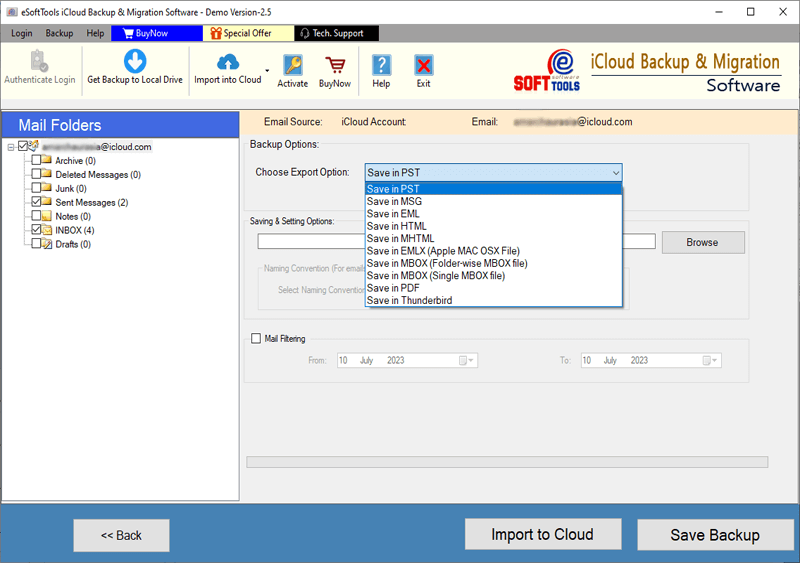
- Apply Other essential settings, including filtering mail by date and naming convention.

- Choose a location on your local drive to save the downloaded files.
- Finally, click the Save Backup button and start the process of exporting iCloud emails to Outlook.

Best features of iCloud Backup and Migration software
- It supports downloading emails from iCloud Mail and saving them in various formats like PST, EML, EMLX, MSG, HTML, MHTML, MBOX, PDF, and Thunderbird Mail files.
- Besides the backup process, migrate emails from iCloud to various cloud and web-based mail apps. Export iCloud emails to Gmail, YahooMail, Office365, Outlook.com, and other IMAP-based mail apps.
- Select a folder from the list of mail folders in your iCloud account and export emails only from the selected folders.
- Download emails from your iCloud account and save them to the desired location on your hard drive. Select a location on your drive and save all downloaded files to that specific location.
- Use the date filter function and export only emails of selected dates from the iCloud account.
- Retrieve and store all iCloud emails in their native format. Transfer iCloud emails to the required file format, ensuring all pertinent details like recipients, BCC, CC, sender, subject, date, message body, attachments, hyperlinks, images, etc., are included.
- Users are able to operate this software on any computer running a Windows OS. The software is compatible with all Windows OS versions, from legacy to current, including Windows 11, 10, 8.1, 8, 7, XP, Vista, and older editions.
Conclusion
There are many reasons why users might need to backup/export iCloud email to Outlook. We have shown the best solution for completing this email export task in the above section. All users can utilize the professional program eSoftTools iCloud Backup & Migration Tool. It will easily transfer emails from iCloud Mail to Outlook without losing any important data.
FAQ
Does it allow me to save emails from my iCloud account locally?
Users can export emails from their iCloud Mail accounts and save them in more than 9 different file formats, including Thunderbird mail files, PST, EML, EMLX, MSG, HTML, MHTML, PDF, and MBOX.
Can I transfer mail folders from an iCloud account to another cloud mail app using this tool?
Users can migrate their mail folders from iCloud Mail accounts to Office365 and all other IMAP-based mail clients like Gmail, Yahoo Mail, Outlook.com, AOL Mail, Webmail, etc.
Can I export iCloud Mail folders to Outlook using this iCloud Backup and Migration tool?
Users can export their iCloud account email folders to Outlook PST files. Additionally, iCloud email can be saved as MSG files, which are compatible with all versions of Outlook.


No Comments yet!