Are you one of those who want to extract attachments from Outlook Mac OLM files on Windows Computers? If yes, then this article is for you. In this blog, we have explained an automated method that will solve your query.
Overview
Microsoft Outlook is one of the popular email clients with its advanced features and interactive graphical interface. In a major development, Microsoft launched the Outlook version for the Mac operating system.
All Outlook versions of mac OS use OLM files to store the data. OLM files store Outlook data like contacts, calendars, tasks, notes, emails, etc in this file format.
Sometimes, in some situations, users want to Extract attachments from OLM files, so to solve this problem, we have written an automated method, step by step, to extract attachments from Outlook Mac OLM files on a Windows System.
Read more-
Automated method to extract attachments from OLM files
With eSoftTools OLM attachment extractor software, you can easily extract attachments from OLM files on a Windows Personal Computer. This is the most reliable and amazing solution to extract attachments from OLM files. With a few simple steps, you can extract attachments from single or multiple OLM files in bulk.
Key features
- Easily extract attachments from single or multiple OLM files at a time.
- Provides a preview of OLM files and folders in the preview panel.
- Take out all attachments by two options- by selecting from the Predefined file extension list or by providing a custom file extension.
- Draw out all attachments from filtered emails according to the Date by giving Date Range(From and To).
- Save extracted attachments in a folder at your desired file location on your system.
- All OLM files of Outlook for Mac versions are supported by this tool.
- Have a simple and easy-to-use graphical interface that can be used by technical and non-technical people.
- Compatible with all editions of the Windows operating system, like Windows 11, 10, 8.1, 8, 7 & below editions.
- Extract and save attachments from OLM files, Folder-wise or Message-wise.
Steps to extract attachments from OLM files
Download and install eSoftTools OLM Attachment Extractor software on your Windows System.
Launch the Software on your system and click Select OLM file on the above bar.

A new window will open, and choose one option from the file adding options- Single OLM file or Bulk OLM file.

Click the Next button, and OLM files will be loaded into the software.

Preview of OLM files & folders will be shown in the preview panel.

Select the OLM files & folders from which attachments are to be extracted and click the Extract Attachment button on the menu bar.

A new window will open and apply the required settings.

Select one option from the Select Attachment Extraction option: Extract attachments folder-wise or Extract attachments message-wise.
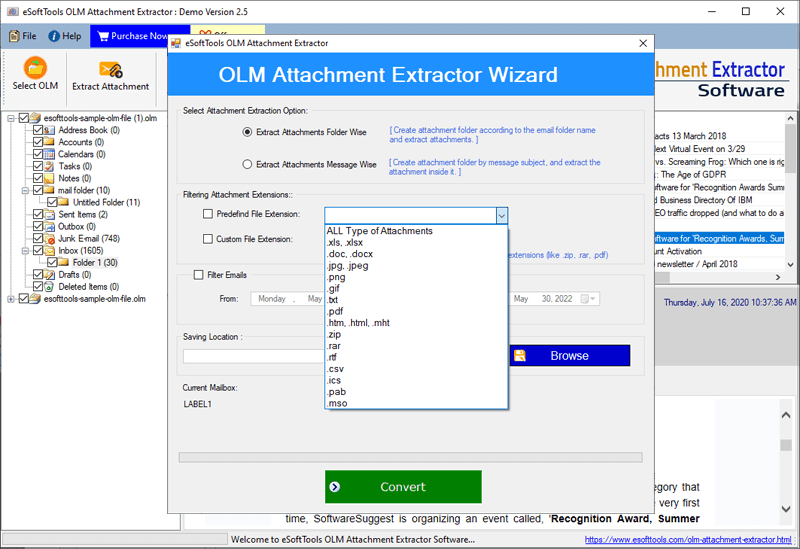
Choose one option from the filtering attachment extensions- Predefined file extension or Custom file extension.

Apply the mail filtering option to filter emails according to Date, and browse the saving location where you want to save the extracted attachments.

At last, click the Convert button and start the attachment extraction process.
Conclusion
In this blog, we have described an automated method to extract attachments from OLM files. This tool can be used for all OLM files of Outlook for Mac versions on Windows systems. If you have OLM files on a Windows PC and want to extract attachments from them, then this tool is helpful. You can try the free demo version of the software to check its working, and if you get the desired result, you can purchase the tool for further use.


No Comments yet!