Are you looking for a solution to convert OST files to NSF format? If yes, then you landed on the right page. In this blog, we have explained an automated method to convert OST files to NSF format.
Overview
With the merger with HCL corporation, IBM Lotus Notes is regaining its popularity. It now has more enhanced security features than the previous version. IBM Notes/HCL Notes saves emails, contacts, calendars, tasks, notes, etc in the NSF file format.
Microsoft Outlook stores emails, contacts, calendars, tasks, notes, etc in the OST file format. OST files are created when a user works in offline mode with Exchange Server.
Read more-
Automated solution to convert Outlook OST to IBM Notes or Domino Server
With eSoftTools OST to NSF Converter software, you can easily convert OST files to NSF format. The user will smoothly and with a few clicks convert the OST file to the NSF format using the tool. After converting Outlook OST files to NSF format, you can export the Outlook mailbox to IBM/HCL/ Lotus Notes.
Key features
- Can convert single and multiple OST files to NSF format at a time.
- Easily recovers corrupted, encrypted and damaged OST files and converts them to NSF format.
- Preview all the Outlook mailbox items, such as emails, contacts, calendars, tasks, notes, etc, in the preview panel.
- Export and save only selected OST mailbox items to NSF format.
- Migrate OST mailbox to cloud-based applications like Gmail, Yahoo Mail, Office 365 and IMAP server.
- Easily performs conversion without Outlook requirement.
- Simple and intuitive graphical interface navigates the whole process easily.
- Compatible with all Windows operating systems like Windows 11, 10, 8.1, 8, 7, & below versions.
Steps to convert Outlook OST to NSF format
Download and launch eSoftTools OST to NSF converter software on your system.
Press the Select OST button and choose the file conversion mode: Single conversion mode or bulk conversion mode.

Press the Start Scanning button and load the OST files according to the conversion mode chosen.
Preview all the OST files and folders in the preview panel and select the items that are needed to convert.
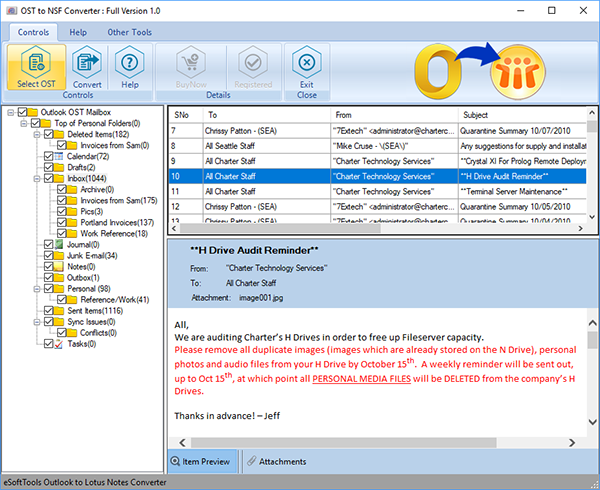
Click on the Save OST button on the menu bar, and a new conversion window will open.
Select the option Export to NSF (Lotus Notes) to convert OST files to NSF format.
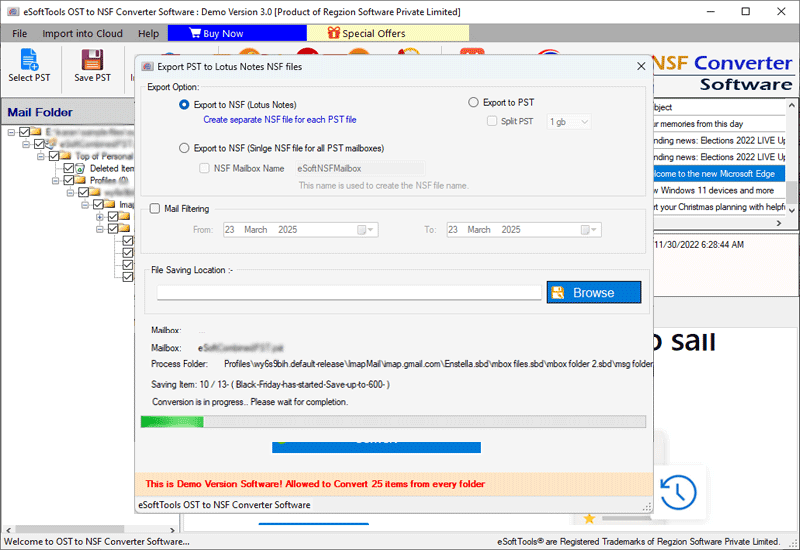
Apply the Mail filtering option if required, and browse the saving location where you want to save the NSF file on your PC.
Click on the Convert button, and the conversion process will start.
Conclusion
In the above blog, we have provided the solution on how to convert Outlook OST to IBM Notes or Domino Server. The automated method explained above is accurate and trustworthy. It will create NSF files that can open in the IBM/HCL/ Lotus Notes email client.


No Comments yet!