EML is the most commonly used file format for storing email messages. Both EML and MSG file formats store single email messages with attachments, sender’s, receiver information, etc. Sometimes users need to convert EML to MSG file in bulk on Windows. In this blog, we have written an automated method to convert EML to MSG file in bulk on Windows.
What is an EML file?
An EML file is an email message file format used to store individual emails, including their content, attachments, and metadata. It is widely supported by various email clients like Microsoft Outlook, Mozilla Thunderbird, Windows Mail, and Apple Mail.
What is an MSG file?
An MSG file is a Microsoft Outlook message file used to store individual emails, calendar events, contacts, or tasks. It contains the complete email structure, including the sender, recipient, subject, body text, attachments, and metadata.
Both EML and MSG store single email messages but in some scenarios there is a need to convert EML to MSG. To do conversion we have written an automated method to convert EML to MSG file.
Why do we need to convert EML to MSG files?
- MSG files are more native to MS Outlook therefore if you need to switch from EML supported email client to MS Outlook you need to convert them into MSG.
- When your current EML client crashes and you need to view EML files in MS Outlook then you need to convert EML to MSG.
- MS Outlook offers advanced security, a user-friendly graphical interface and more stability than other email clients.
- Compared to EML files, MSG occupies less storage space so it is a better choice for sharing and uploading to the cloud.
Smart solution to convert EML to MSG file
eSoftTools EML Converter suite allows conversion of EML to MSG files in batch, so users can save valuable time and effort. It is a well-known software that can convert multiple EML files into MSG files. There are no file size restrictions, you can go and convert multiple EML files into MSG files.
Also Read:- How to Convert MSG file to EML file?
How to convert EML to MSG files?
Download and install eSoftTools EML Converter Suite software on your system.

Click on Select EML folder (To choose multiple EML folders) or EML files (To choose EML files) and click the Next button to add files and folders in the software and start scanning.

In the preview panel, you can view EML folders and can select the EML files to be converted into MSG files.
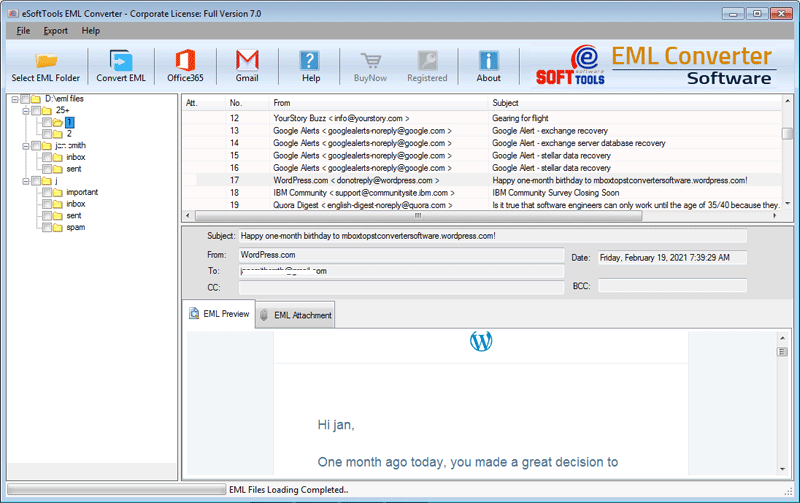
On the EML converter wizard, choose Export in MSG file format from the options in the conversion wizard.
Browse the location where you want to save the MSG file in your system.
Apply the mail filtering if you want to filter emails according to the Date Range (From and To).
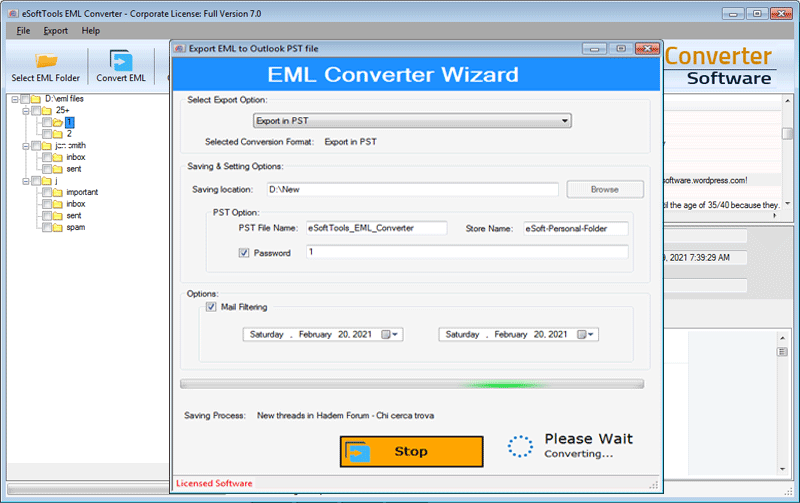
Click the convert button and start the conversion process from EML to MSG.

Benefits and features of EML Converter software
- Convert both EML and EMLX files with attachments.
- Allows to add multiple EML folders in the software.
- Convert EML files into another file format like MSG, MBOX, NSF, HTML, MHTML, etc.
- Preview of EML files/folders before conversion in the preview panel.
- Enables loading of EML files from different locations of the user system and conversion in bulk.
- Maintains the folder hierarchy and data formatting while converting.
- Software preservers email formatting and maintains email meta properties (To, cc, bcc, subject, Date & Time) during conversion.
- Can migrate EML files to cloud-based applications like Office 365, Gmail, Yahoo Mail, Outlook.com and IMAP.
- Compatible with all editions of Windows Operating System such as Windows 11, 10, 8.1, 8, 7 & below versions.
Conclusion
How to convert EML to MSG file in bulk on Windows is the most searched query. In this blog, we have described an automated method to convert EML to MSG file. eSoftTools EML Converter Suite is a trusted and valued software by IT industry experts.


No Comments yet!