Looking for a solution to transfer emails from Lotus Notes to G-Suite? If yes, this article provides the right solution. Here, we explain the easiest way to migrate Lotus Notes emails to G-Suite/Google Workspace. Let’s start.
Overview
Lotus Notes (now IBM Notes/HCL Notes) is a desktop application for managing email profiles, allowing users to access their email accounts locally.
It enables users to send/receive emails and handle other tasks such as managing contacts and calendars. All data linked to user email profiles is stored in a Lotus Notes data file called NSF.
The NSF database file is easily accessible to users in their computer’s AppData > Local > Lotus > Notes > Data folder.
While using Lotus Notes, users sometimes find themselves needing to move to a different email platform like G-Suite.
Also Read:- Lotus Notes to Office 365 Migration Step by Step
What is G-Suite/Google Workspace?
Google Workspace (G-Suite) is a collection of cloud-based productivity tools provided by Google. It incorporates various Google applications like Gmail, Google Drive, Google Docs, etc. Users are able to access these online/web-based services via their custom business email accounts (rather than their primary Gmail accounts).
Why Migrate Lotus Notes Email to G-Suite/Google Workspace?
- Lotus Notes is a desktop application and an older technology. As technology advances, users prefer switching to more reliable and advanced email apps such as Gmail.
- Gmail is a cloud/web application, enabling users to easily access their email accounts via a web browser on any device or operating system. Users can utilize a Gmail account from multiple locations simultaneously.
- Google Workspace costs users much less compared to Lotus Notes.
- Some users prefer moving emails from Lotus Notes to Gmail to make backup copies of their important emails.
Instant Solution to Migrate Lotus Notes Email to G-Suite/Google Workspace
Easily transfer emails from Lotus Notes to Google Workspace with the eSoftTools Lotus Notes to Gmail Migration Software. This utility allows users to export Lotus Notes emails from NSF files to both their primary Gmail and Google Workspace accounts. With a simple process, it completes the migration and provides instant results. This software allows users to directly open NSF files and export selected folders. It also offers several advanced features to simplify email migration.
How to Migrate Lotus Notes Emails to G-Suite/Google Workspace?
- Get and run the eSoftTools Lotus Notes to Gmail migration software.

- Click the ‘Select NSF’ button and choose single or bulk NSF file conversion mode.
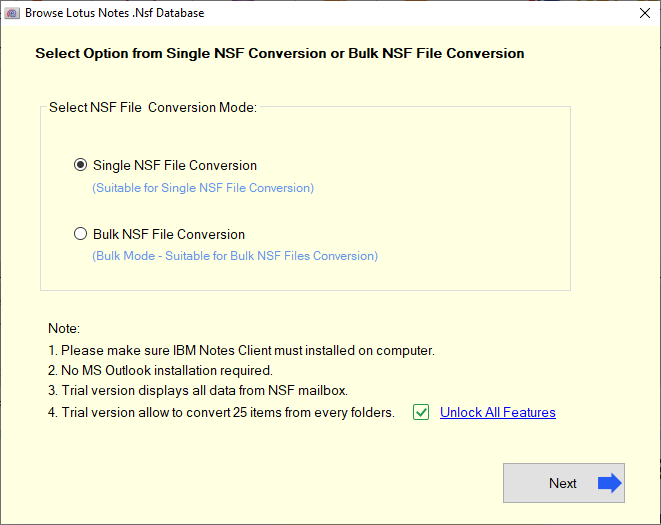
- Import the Lotus Notes NSF files into the software and click the Start Scanning button.

- Scan the NSF file to load all Lotus Notes mailbox folders and data items.

- Review each item, choose the necessary folders, and hit the Import to Gmail button.

- Type in your Google Workspace account email address and its associated app password.

- Choose the input folder name for migration and select options to filter emails by date.
- Hit “Connect and Import” and bring your emails from Lotus Notes into Google Workspace.
Conclusion
Migrating data from Lotus Notes to Google Workspace is now mandatory for many users. The majority of these users wish to migrate data from their legacy email profiles set up in Lotus Notes. This article details the best solutions available to assist users. Use the Lotus Notes to Gmail migration tool to safely migrate Lotus Notes Emails to G-Suite/Google Workspace.


No Comments yet!