Lotus Notes is a widely used and secure email application, but users are abandoning it and moving to other cloud platforms. One reason for switching from Lotus Notes may be looking for a cloud platform for email access. And Yahoo Mail offers this feature. Transferring Lotus Notes NSF files to Yahoo Mail is a challenging task for all users. However, in this blog, we will provide both manual and straightforward methods to import Lotus Notes NSF files to Yahoo Mail safely and easily.
Why do the users need to import Lotus Notes NSF files to Yahoo Mail?
- Small and large business enterprises find it challenging to manage e-mails in the Lotus Notes application.
- The user does not need to have technical knowledge to work on Lotus Notes.
- The interface of Yahoo Mail is more user-friendly than that of Lotus Notes.
Also Read:- How to Export Lotus Notes emails to Outlook?
Instant Solution to Import Lotus Notes NSF files to Yahoo Mail
A manual method can be used to import Lotus Notes NSF files to Yahoo Mail, but sometimes it doesn’t yield the desired results. Furthermore, it requires more technical knowledge. For user convenience, we developed eSoftTools NSF to PST Converter software. It’s the best solution for quickly importing Lotus Notes NSF files to the Yahoo Mail cloud emailing platform. This allows users to import Lotus Notes NSF file to Yahoo Mail without any issues.
Key features of NSF to PST Converter:-
- Import Lotus Notes NSF files to Yahoo Mail instantly with this tool.
- The user can transfer the NSF file of Lotus Notes to Yahoo Mail and some other options like Gmail, Office 365, Zimbra, Outlook, etc.
- This tool preserves important email elements like subject line, date, attachments, layout, etc., during the conversion process.
- This tool will keep your data safe and secure, ensuring you never lose a single piece of information.
- It maintains the folder hierarchy after converting NSF files.
How to Import Lotus Notes NSF files to Yahoo Mail?
- Install this NSF to PST converter on your computer.
- Open it and click on the ‘Select NSF’ button.

- It will provide you with two options to select one or more NSF files.
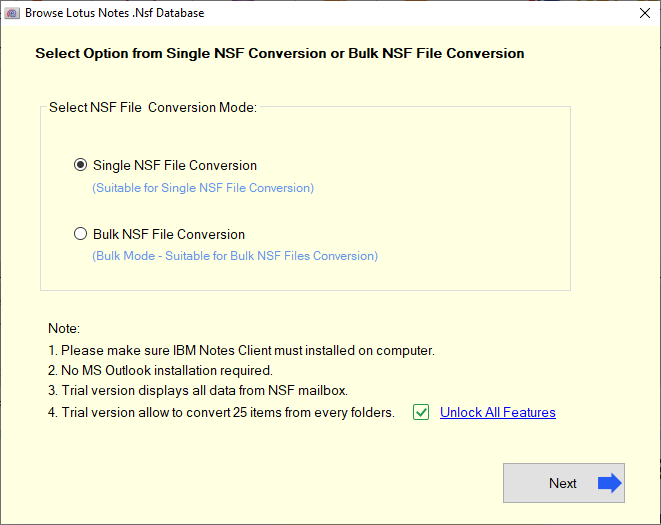
- Now select the NSF files and click on Start Scanning.

- The software will load all the items in the mailbox; you just need to select the required items.

- Now, click on the Import to Yahoo option.

- Enter your email address and generate a third-party app password for Yahoo Mail. Enter it in the Password field, then click the Connect & Import button.
- The transfer process is complete.
Conclusion
There are both manual and automated methods available to import Lotus Notes NSF files into Yahoo Mail, but the best way is to use eSoftTools NSF to PST Converter software. It allows you to transfer Lotus Notes files to Yahoo Mail with a simple and easy-to-understand interface. It helps users easily export Lotus Notes files without any technical knowledge.


No Comments yet!