If you want to export Thunderbird to a PST file and use it in Outlook, but don’t find a reliable solution? If yes, then you are on the right page. In this blog, we have explained an automated method for exporting Thunderbird data to PST with 100% accuracy and no data loss.
Mozilla Thunderbird is a free, open-source email client that runs on different operating systems, like Windows, Linux & Mac. It can add IMAP/POP 3 email accounts and manage emails, contacts, calendars, tasks, notes, etc.
Microsoft Outlook is another email client that uses PST files to store emails, contacts, calendars, tasks, notes, etc. This file format is used for backup purposes and in transferring email data from one computer to another.
Why export Thunderbird to PST?
A few reasons to export Thunderbird to PST are explained below.
- Since Thunderbird supports the MBOX file format, and to migrate from Mozilla Thunderbird to Outlook, users need to convert MBOX files to PST format.
- Outlook provides advanced security features and integrates with Microsoft 365 applications like Microsoft Word, Excel, PowerPoint, etc.
- Converting Thunderbird to PST provides a data backup option in case of MBOX file corruption or a Virus/malware attack.
How to export Thunderbird to PST automatically?
eSoftTools Thunderbird to Outlook PST converter software provides a reliable and efficient way to export Thunderbird mailboxes to PST format. This software will convert the Thunderbird profile to PST format without any hassle and with 100% accuracy.
With this software, users can convert a Thunderbird profile to different email file formats like PST, EML, EMLX, MSG, NSF, HTML, etc. Apart from conversion, this tool migrates Thunderbird profiles to cloud applications like Gmail, Yahoo Mail, Office 365 and IMAP email accounts.
Steps to export Thunderbird to PST with screenshots
Download and install eSoftTools Thunderbird to Outlook PST converter software on your Windows PC.

- Click on the Add file/folder button on the menu bar and choose the file conversion mode
- Select MBOX file: To select a single MBOX file.
- Select MBOX folder: To add multiple MBOX folders containing the MBOX files.
- Auto-load Thunderbird profile: To choose the configured Thunderbird mailbox for conversion.
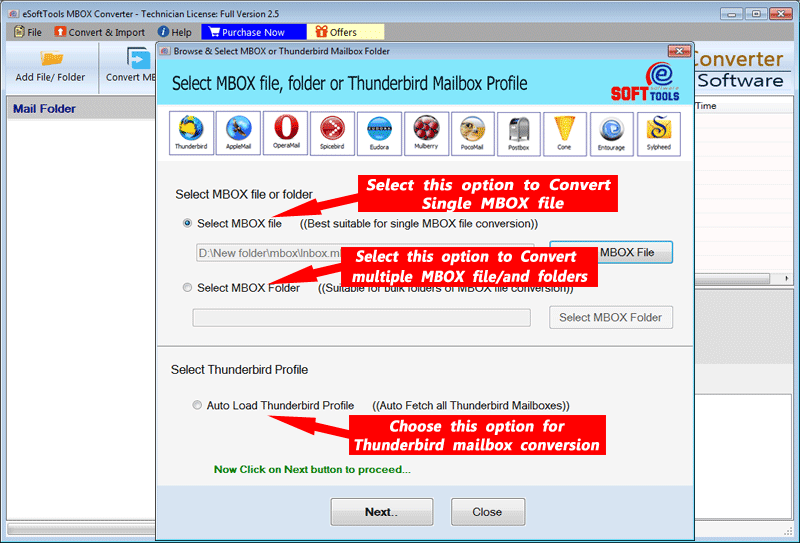
Click the Next button and preview MBOX files & folders in the preview panel in a tree structure.

Select the files & folders that are required to convert to PST format.

Click on the Convert MBOX button, and a new conversion window will open.
Choose the conversion option PST (available in two forms).
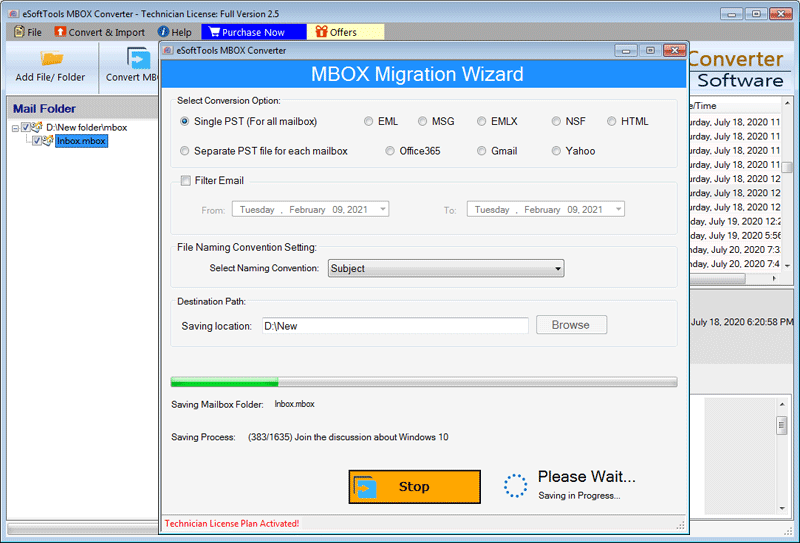
Apply the email filter feature to filter emails according to Date.
Browse the saving location where to save the PST file.
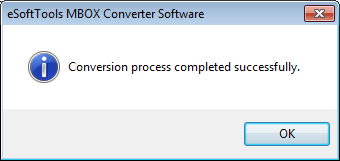
At last, click the Convert button to start the conversion process.
Benefits and features of Thunderbird to Outlook PST converter software
- Preserves the folder hierarchy and email properties during conversion and migration.
- Create a PST file with two conversion options- Single PST file ( for all mailboxes) and Separate PST file ( for each mailbox).
- The converted PST file comfortably runs on all editions of MS Outlook 2021, 2019, 2016, 2013, 2010, 2007 & 2003.
- Can convert multiple MBOX files to PST and other email formats in bulk.
- This tool can extract all the files & folders from the MBOX/SBD( a file that contains Thunderbird Mail files/folders).
- In the preview panel, it displays all the email files/folders in the tree structure.
- Upload MBOX files of any size without any restrictions.
FAQs
Q. Does the Thunderbird and Outlook installation require exporting Thunderbird to PST?
Ans. No, while using the third-party application eSoftTools Thunderbird to Outlook PST converter software, there is no need to install Thunderbird and Outlook in your system. Only MBOX files are needed for converting them to PST format.
Q. Are attachments and email formatting preserved during the conversion and migration process?
Ams. Yes, all the attachments and email formatting are preserved during the conversion and migration process of this tool.
Q. Can I convert multiple MBOX files to PST format in bulk?
Ans. Yes, this tool allows users to add multiple MBOX files into the software and convert them to PST and other email file formats like EML, EMLX, MSG, NSF, etc.
Q. Can I preview MBOX files & folders before conversion to check accuracy?
Ans. Yes, this tool extracts all files & folders from the MBOX/SBD files and previews them in the tree structure in the preview panel.
Q. Is the demo version available to check how the software works?
Ans. Yes, the company provides a free demo version in which users can convert 25 emails from MBOX folders and convert them into any format.
Conclusion
There are many advantages of exporting Thunderbird to the PST, like the user can avail all the benefits of Microsoft Outlook, and it is a good backup option. The manual method is available, but it requires technical knowledge and needs to install Microsoft Thunderbird and Microsoft Outlook for conversion. However, the eSoftTools Thunderbird to Outlook PST converter software doesn’t require technical knowledge or any other application for conversion and migration.


No Comments yet!