Are you looking to remove attachments from MSG files? If yes, then read this blog. In this blog, we have written an automated method that will guide you on how to delete Outlook Message (MSG) file attachments.
Overview
MSG is also a file format, like a PST of Microsoft Outlook, that is used to store a single message with attachments in a single file.
Most Outlook users suffer from less storage space. So, most Outlook users store information on the local drive in the MSG format. This MSG format stores single message information with multiple attachments in the local drive.
These MSG files contain attachments in the form of text, audio, video, images and many more files. These files, when in large numbers, also fill the local drive storage space. Therefore, users seek a method to remove attachments from the MSG file.
User Query: I have a lot of MSG files on my local computer. I want to send a MSG file to someone else, but I don’t want to send attachments with it. Attachments contain personal information of my customers, and I don’t want to share it. Do you have a solution for this?
Microsoft Outlook doesn’t have a solution to remove attachments from a MSG file. Users must use a third-party application to preserve email metadata and remove attachments from MSG files.
Also Read: How to Convert MSG to CSV Format?
Automated method to delete Outlook Message (MSG) file attachments
With eSoftTools MSG attachment Remover Software, you can easily remove attachments from MSG files. This tool is a powerful and reliable solution to remove unlimited attachments from MSG files at a time.
Key features
- Easily removes attachments from MSG files and thus reduces MSG file size.
- Removes attachments from MSG files of any size.
- Get a preview of MSG emails, contacts, calendars, tasks, notes, etc., inside the preview panel before extracting attachments.
- Preserve email meta-properties( To, cc, subject, body, date and time) during the removal of attachments from MSG files.
- Have a feature of email filtering that filters emails according to Date (From and To).
- Provide a naming convention feature that saves and names files according to Subject, Date and From.
- The user can save output MSG files without attachments in the desired location on their computer.
- A simple and intuitive graphical interface can be used by technical and non-technical people easily.
- Consistent with all editions of the Windows Operating System, like Windows 11, 10, 8.1, 8, 7 & below versions.
Steps to delete Outlook Message (MSG) file attachments
- Download and launch eSoftTools MSG attachment Remover Software on your Windows system.
- Press the Select MSG folder button on the above bar and upload MSG files into the software.

- A preview of all MSG files and folders will be displayed in the preview panel, and select files from which attachments are to be removed.

- Press the Remove attachment & Save button, and a new conversion window will appear.
- Browse the Saving location to save output files and select any one option from the Attachment Settings.
- Apply the Naming convention and email filtering feature according to your requirements.
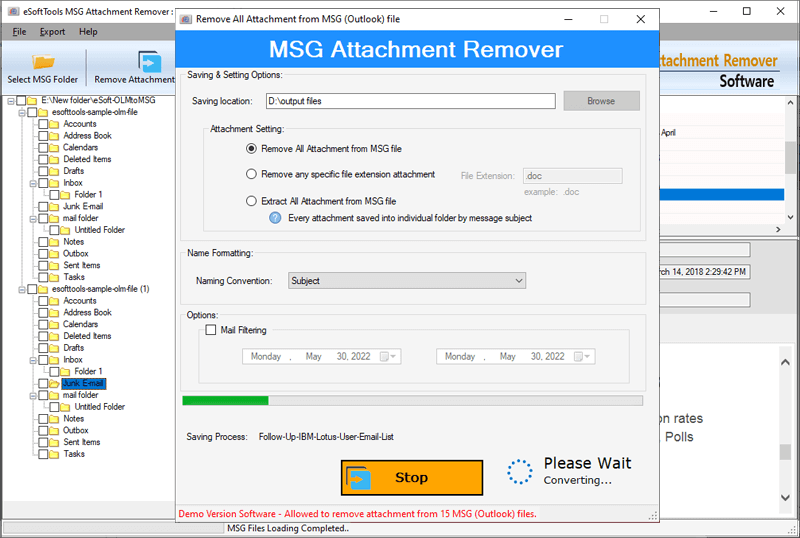
- Press the Convert button, and the attachment-removing process will be initiated.
Conclusion
In the above article, we have described an automated method for removing attachments from MSG files. If you want to remove attachments from MSG files, you can download the software. We have provided the demo version, by which users can check how the software works. If you have a query, then you can ask our support team and they will assist you.


No Comments yet!