Are you looking for a way to open an MBOX file on Windows 10? If yes, then by reading this blog, you will learn how to open a MBOX file on Windows and learn about automated tools used to open MBOX files.
An MBOX file is a file in which all the emails and their attachments are stored together. MBOX file keeps all the email messages in ASCII format and attachments in an encoded way.
Applications that support the MBOX file
An MBOX is a database file that stores all emails and their attachments in a list. MBOX files are first supported by LINUX hosts, but later on, MBOX files are supported by email clients like Mozilla Thunderbird, Apple Mail, etc.
MBOX files are flexible and convenient to use, and they can be opened in any email client.
Also Read:- How to Import MBOX to Roundcube Safely without Data Loss?
The email clients that can open MBOX files are
- Mozilla Thunderbird – This email client can store and run MBOX files.
- Apple Mail- This is only for Mac OS users.
The MBOX file is opened in Windows using Mozilla Thunderbird
- The MBOX file is opened in Windows using the Mozilla Thunderbird software.
MBOX file opens in MS Outlook
The MBOX file is opened in Outlook with the help of eSoftTools MBOX Converter software. This software can convert MBOX files to PST files easily, quickly, and with 100% accuracy. You can load single and multiple MBOX files at a time. You can preview the inner contents of the MBOX file in the side panel of this software.
If you want to filter emails according to date, then this feature is available in this software. In a few steps, you can convert an MBOX file into a PST file in this software. You can split the large-sized MBOX files into multiple small PST files with this software. You can also convert MBOX files into other file formats such as EML, EMLX, MSG, HTML, vCard, ICS, etc.
How to open an Mbox file in Windows?
Download and install the eSoftTools MBOX Converter software.

- Add the MBOX file to the software.
- Single MBOX file– You can add a single MBOX file to the software.
- Bulk MBOX files- You can add multiple MBOX files to the software.
- Select Thunderbird Profile- Load all Thunderbird emails from Mailbox.
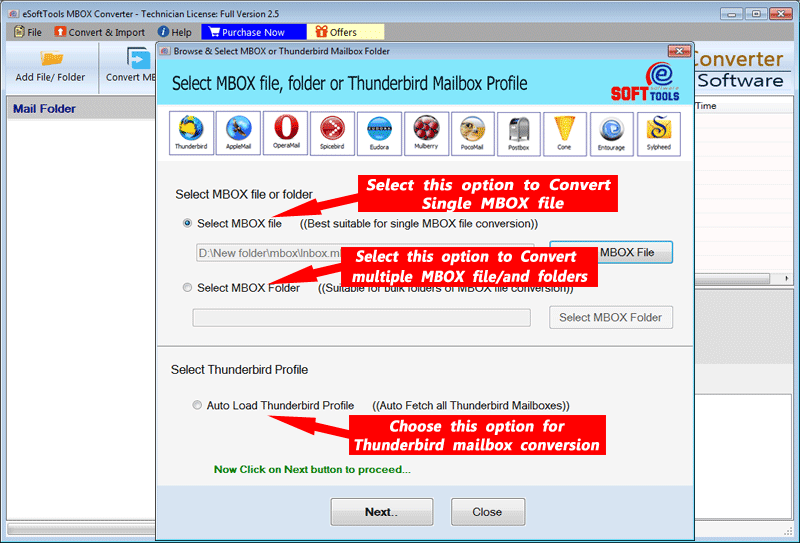
- After adding the MBOX files, click Next.
- You can preview the files/folders of the MBOX file in the panel.

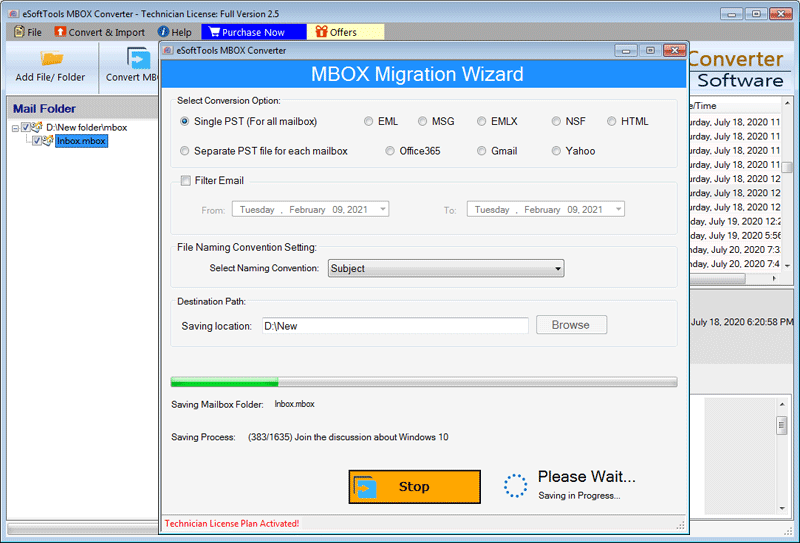
You can select the files/folders that you want to export and select the file format PST.
You can split large-sized MBOX files into small-sized PST files.
Browse the location where you want to save your PST file.
Click the ‘Convert’ button and start the conversion process.
Conclusion
You can open an MBOX file in Windows using Mozilla Thunderbird Software and convert the MBOX files into PST files using eSoftTools MBOX Converter Software. The use of software is an easy and reliable method.


No Comments yet!