Are you thinking of transfer/migrate Windows Live Mail to Yahoo Mail? If yes, then this blog is for you. In this, we will tell you the best way to do this. So that you can transfer emails very quickly, let’s start reading.
Overview
Windows Live Mail, formerly known as Windows Mail Desktop, is a free email client by Microsoft. It is the successor to Outlook Express in Windows XP and Windows Mail in Vista. It is a very easy-to-use desktop email program that lets you send and receive emails.
Yahoo Mail is a free email service designed to send emails from one server to another. It also provides features such as an email search and a contact list. Yahoo Mail was developed by the American company
Smart Solution to Transfer/Migrate Windows Live Mail to Yahoo Mail
To quickly transfer Windows Live Mail to Yahoo Mail, try eSoftTools Windows Live Mail Converter software. With the help of this software, you can migrate emails to Yahoo in just a few simple clicks without losing any data. You can also migrate Windows Live Mail to PST, MBOX, NSF, MSG, EML, EMLX, HTML, Office 365, and other files. A free demo is also available for this software.
Read Also:- How to Export Windows Live Mail to PST Without Outlook?
Key features of Windows Live Mail Converter
- Transfer/Migrate your Windows Live Mail to Yahoo Mail with a very simple process.
- Perform fast email migration from Windows Live Mail to Yahoo Mail.
- Export from single or multiple mailbox folders at one time.
- See previews of all Windows Live Mail profile mail folders and their internal items.
- Migrate Windows Live Mail to Multiple Formats with the help of this Software.
- The graphical user interface of this software is very clean so that all users can use it easily.
- This software works on all new and old versions of the Windows operating system, including – Win 11, 10, 8.1, 8, 7, XP, Vista, etc.
Steps to Transfer/Migrate Windows Live Mail to Yahoo Mail
- Download and Install eSoftTools Windows Live Mail Converter Software on your computer.
- Now click on the Select WLM Mailbox button.

Select the option to add and load Windows Profile Mail folders:- “Auto Detect WLM Profile” & “Select WLM Profile Mail folder”
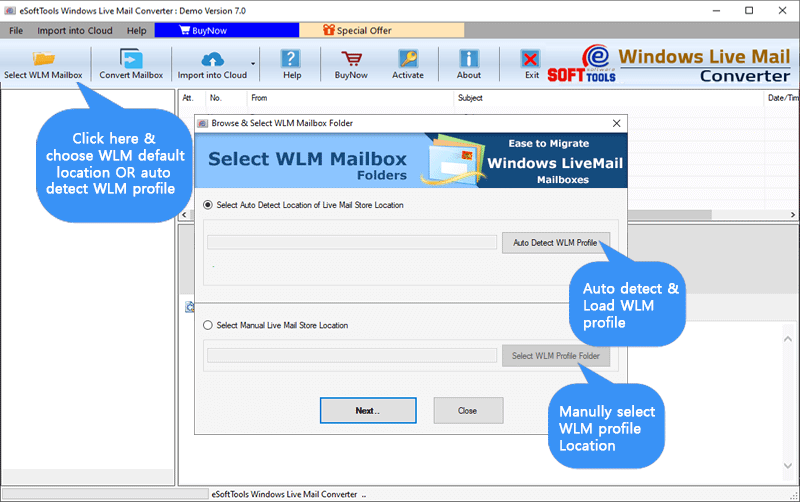
- Select the option to add WLM mail folders, and click the Next button.
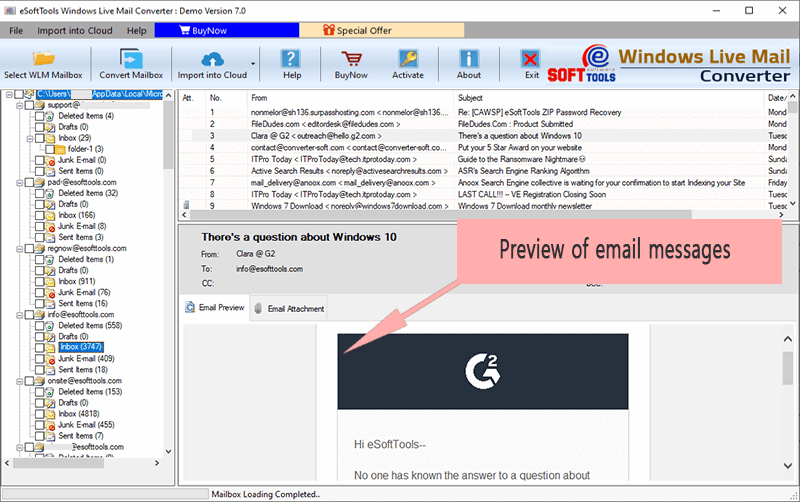
- Load all selected mail folders along with subfolders and their internal email items.

View a preview of each WLM email item and select the required mail folders.
Press the button to import to the cloud and select the Import WLM to Yahoo Mail option.

Enter the Yahoo Mail email address and the third-party app’s password in the input.

- After adding the account, press the Authentication Login button.
- Apply the mail filter and folder input settings, and press the button to import into your Yahoo account.

Conclusion
In this blog, we have told you the simplest way to transfer Windows Live Mail to Yahoo Mail, by which you can migrate emails to Yahoo in a short time and that too without any problem. You can also try the free demo of this software, in which you can export 25 items in all your WLM folders for free.


No Comments yet!